Anker 555 USB-C Hub 8-in-1
A bulletproof 8-in-1 MacBook hub with 4K60 HDMI, 10Gbps USB-C, Ethernet, and 85W passthrough charging for under $40.
Price may vary. As an affiliate, we earn from qualifying purchases.
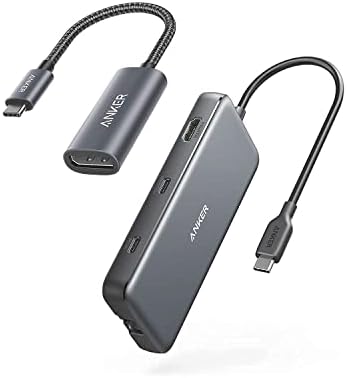
What we like
- True 4K at 60Hz HDMI output (DP 1.4 laptops) — rare at this price
- 10Gbps USB-C data port handles fast SSDs without bottlenecks
- 85W passthrough charging keeps a 14" MacBook Pro at full power
- Compact, slim aluminum body with a built-in cable that tucks away
Could be better
- Single HDMI only — no dual-display support
- Gets warm under sustained load (typical for compact hubs)
- Built-in cable is short (~7.5") and can't be replaced if it fails
Full Review
The Anker 555 is what I recommend when someone wants a MacBook hub that just works without spending Thunderbolt-dock money. It’s the everyday hub — not the most ports, not the fastest, but the one that doesn’t drop your monitor mid-meeting or randomly disconnect your SSD.
Build and Daily Use
The aluminum shell feels like a smaller cousin of an Apple accessory — solid, slim (0.6”), and cool to the touch under normal load. The 7.48” built-in USB-C cable is the right call for a portable hub: long enough to reach a side port without dangling, short enough to stay tidy. After months of being shoved into bags and yanked out at coffee shops, the cable strain relief is the part I’d worry about long-term, but Anker’s 18-month warranty covers most failure modes.
The 4K60 HDMI Is the Headline
Plenty of $30 hubs claim 4K HDMI but cap out at 30Hz, which makes mouse movement look like a flipbook. The 555 does proper 4K at 60Hz on any DP 1.4 laptop (every M-series MacBook qualifies), and that’s the single biggest reason to pick it over generic Amazon hubs. Text is crisp, scrolling is smooth, and you don’t get the weird input lag that sub-60Hz output causes.
Data and Charging
The 10Gbps USB-C and two USB-A ports run at full USB 3.2 Gen 2 speed — I see ~950MB/s on a Samsung T7 Shield, which is the SSD’s ceiling, not the hub’s. The 85W passthrough is enough to keep a 14” MacBook Pro charging during heavy load; a 16” Pro under full GPU stress will draw down the battery slowly, but that’s true of every non-Thunderbolt hub.
Where It Falls Short vs. Premium Docks
If you need dual external displays, this isn’t the hub — you’ll want the CalDigit TS4 or UGREEN Revodok Pro 109 for that. The 555 is single-display only, and there’s no DisplayPort, no audio jack, and no extra USB-C downstream port. For a desk setup that stays put, a Thunderbolt dock is the better long-term buy. For a hub that lives in your bag and handles 90% of MacBook scenarios, the 555 is the answer.
Who Should Buy This
Buy the Anker 555 if you have a MacBook (or Windows ultrabook with DP Alt Mode), need one external 4K monitor plus Ethernet and a card reader, and don’t want to spend $300+ on a Thunderbolt dock. It’s the hub I hand to friends who ask “what should I get?” — boring, reliable, and cheap enough that losing it on a flight isn’t a crisis. If you need dual monitors or run a permanent desk setup with eGPU-class peripherals, skip this and step up to a CalDigit TS4 instead.


