Anker 675 USB-C Docking Station with Monitor Stand
A 12-in-1 USB-C dock built into a monitor stand with wireless charging — the cleanest desk solution for renters who can't drill cable holes.
Price may vary. As an affiliate, we earn from qualifying purchases.
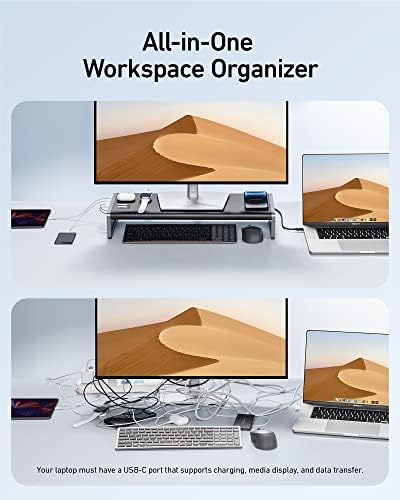
What we like
- Lifts monitor 4 inches and hides the dock in the same footprint
- 100W USB-C passthrough handles 16-inch MacBook Pros without issue
- Integrated 10W Qi pad keeps a phone topped up without another cable
- Dual 4K HDMI outputs drive two external displays from one cable
- Frequently drops to ~$90 during Amazon sales
Could be better
- Both video outs are HDMI only — no DisplayPort or USB-C video passthrough
- Second HDMI caps at 4K/30Hz, fine for productivity but choppy for scrolling
- Stand height is fixed; tall users may still need a riser on top
Full Review
The Anker 675 solves two problems at once: monitor height and cable chaos. If you rent and can’t drill grommet holes through your desk, or you just don’t want a dangling dock cluttering the surface, this is the most elegant option on the market. The dock lives inside the stand — you connect everything to the back, then run one USB-C cable to your laptop.
Build and Layout
The aluminum top plate is rated for 17.6 pounds, which covers every reasonable monitor up to about 32 inches. The 4-inch lift puts a 27-inch display at roughly eye level for an average-height user sitting in a properly adjusted chair. The space underneath fits a full-size keyboard and a mouse, which is the whole point — your desk surface stays clear.
Port placement is split front and back. Two USB-A and the SD slots face you for plugging in flash drives and SD cards. The rest — HDMI, Ethernet, the upstream USB-C — live around back where they belong. The cable cutout on the rear is wide enough to route a thick braided USB-C without crimping.
Daily Use
Plugged into a 14-inch MacBook Pro, the 100W passthrough kept the battery at 100% under heavy load. The Qi pad on top is positioned far enough back that a phone sits flat without sliding when you drop it down one-handed. Charging speed is the standard 10W — not fast, but it’s free top-ups while you work.
Dual external monitors work, but read the spec carefully: HDMI 1 does 4K/60Hz, HDMI 2 caps at 4K/30Hz. That’s fine if your second screen is a vertical reference display or 1440p, but 4K/30 on a primary monitor looks laggy when scrolling. Most buyers run one 4K and one 1440p and never notice.
The HDMI-Only Limitation
The big asterisk: there’s no DisplayPort and no USB-C video output. If your monitor is DisplayPort-only or you want 4K/120Hz, this dock is out. It’s also a problem for some ultrawides that only accept DisplayPort at full refresh. Check your monitor’s input options before buying.
Who Should Buy This
Buy this if you’re a renter, a remote worker in a tidy home office, or anyone running one or two HDMI monitors who wants the cleanest possible desk. The wireless charging pad is a genuine bonus, not a gimmick. Watch for the frequent $80-off deal that brings it under $100 — at that price it’s a no-brainer. If you need DisplayPort, Thunderbolt 4, or more than two displays, look at the CalDigit TS4 instead.


