Anker 777 Thunderbolt 4 Docking Station (Apex)
A 12-in-1 Thunderbolt 4 dock that matches the CalDigit TS4 on ports and laptop charging for about $80 less.
Price may vary. As an affiliate, we earn from qualifying purchases.
What we like
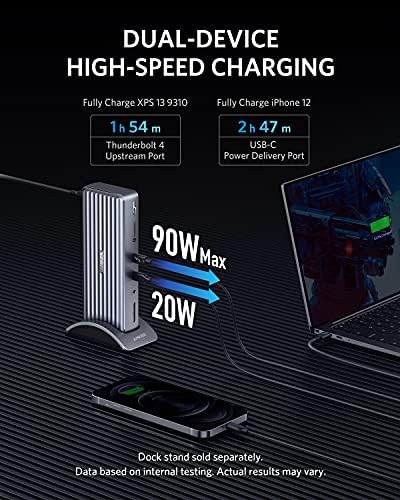
- 90W upstream charging is enough for a 14" MacBook Pro under full load
- Triple 4K or single 8K display support via two HDMI and one Thunderbolt 4 downstream
- Solid aluminum chassis that doesn't slide around or rattle
- Four USB-A ports and an SD slot cover most legacy desk accessories
Could be better
- Gigabit ethernet instead of the 2.5G you get on the CalDigit TS4
- Front-facing ports are USB-A only — no front Thunderbolt or USB-C
- Not compatible with M1/M2 MacBooks for dual external displays without DisplayLink workarounds
Full Review
The Anker 777 is the dock to buy if you’ve been eyeing the CalDigit TS4 but can’t stomach the $400 sticker. It hits nearly every spec that matters — 90W charging, triple 4K, 12 ports — for $299. After a few years on the market, Anker has quietly closed the build-quality gap that used to justify CalDigit’s premium.
Port Layout and Daily Use
The 777 lays its ports out sensibly. Four USB-A ports and the SD slot sit on the front edge for quick-swap peripherals, while the two HDMI 2.0 outputs, downstream Thunderbolt 4, gigabit ethernet, USB-C PD, and 3.5mm jack stay tucked on the back. One thing the TS4 does better: a front-facing USB-C port. On the 777, your phone charging cable has to run around back, which gets annoying if you rotate devices often.
Displays and MacBook Pro Compatibility
Triple 4K at 60Hz works without issue on Intel MacBooks and all Apple Silicon Pro/Max chips (M1 Pro and newer). If you’re on a base M1 or M2 MacBook Air, Apple’s silicon still caps you at one external display through Thunderbolt — that’s a macOS limitation, not a dock problem, but worth knowing before you buy. For Windows Thunderbolt 4 laptops, the 777 drives two HDMI monitors plus the downstream TB4 without drama.
777 vs. CalDigit TS4
The TS4 has a faster 2.5G ethernet port, 98W charging instead of 90W, and a slightly more premium feel. That’s $80 of difference. For most MacBook Pro users running a gigabit home network, the 777 gives up nothing you’ll actually notice. If you’re hard-wiring into a 2.5G or 10G switch or you need the extra 8W for a 16” MacBook Pro under sustained load, the TS4 earns its premium. Otherwise the 777 is the smarter buy.
Who Should Buy This
Get the Anker 777 if you want a full-featured Thunderbolt 4 dock for a MacBook Pro or Thunderbolt 4 Windows laptop and don’t need 2.5G ethernet. If you’re running a 16” MacBook Pro under heavy creative loads, or your home network is already upgraded past gigabit, spend the extra $80 on the CalDigit TS4.


