Power & Cables · Review
Anker Prime 250W 6-Port GaN Charging Station
A 250W desktop charger with four USB-C ports, two USB-A ports and a per-port wattage LCD. It can replace a whole desk of power bricks, at a premium price.
Published
Our verdict
4.4 / 5
Price at time of review
$149.99
Prices change. As an affiliate, we earn from qualifying purchases — it never decides the verdict.
What we like
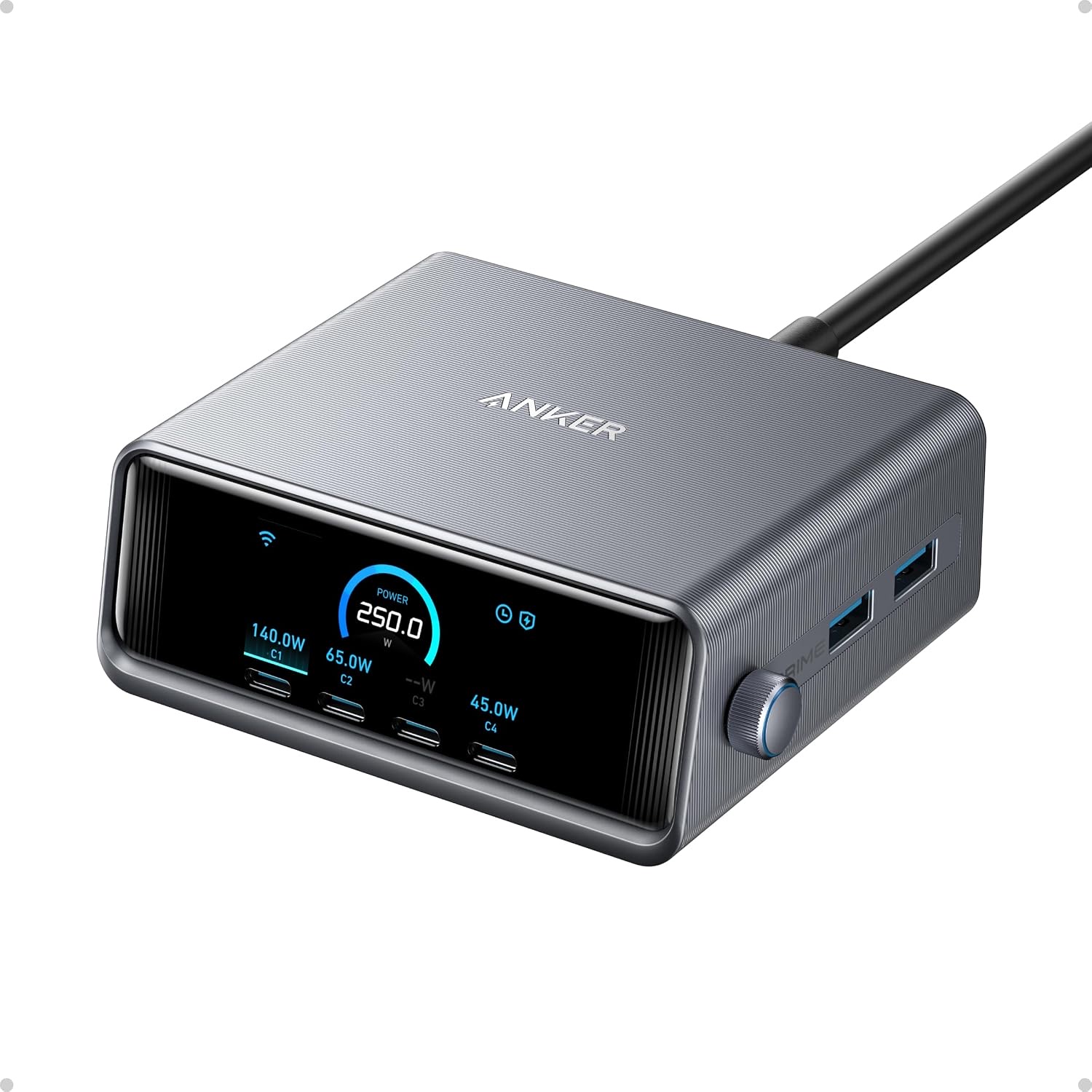
- 250W total output across four USB-C and two USB-A ports covers a laptop, phone, tablet and accessories at once
- The 140W USB-C port charges a 16-inch MacBook Pro to 50% in about 25 minutes
- The 2.26-inch LCD shows live status and speed, so you can see what each device draws
- The smart dial and Anker app let you adjust output and set up scheduling
- Compact for its output at 4.18 × 1.58 × 3.64 inches, with a 24-month warranty
Could be better
- $149.99 is a lot if you only charge two or three devices
- The app's smart features need 2.4 GHz Wi-Fi only, which some networks make awkward
- It is built for desktop use and Anker doesn't recommend it for travel, at 22.58 oz (640 g)
- Total power is shared, so a full load will not give every port its maximum
Full Review
Build and Design
The Prime 250W is a compact upright block, not a flat brick. At 4.18 × 1.58 × 3.64 inches it takes up little desk space for what it does. At 640 g it feels dense and stays put once the cables are plugged in.
Anker says it is designed for desktop use and not recommended for travel. That is fair. This is a charger you leave at your desk and plug everything into.
The Display and Controls
The 2.26-inch LCD is the main reason to pay extra. It shows live charging status and speed, so you can see which device is pulling power instead of guessing. It is a real convenience when four or five cables are plugged in.
The smart dial lets you change output on the spot. The Anker app adds scheduling and other smart features, but it works only on 2.4 GHz Wi-Fi. If your setup is 5 GHz only, expect some fiddling. You can use the charger fine without the app.
Daily Use
The headline number is the 140W USB-C port, which takes a 16-inch MacBook Pro to 50% in about 25 minutes. The other USB-C ports cover a second laptop, a tablet and a phone. Two USB-A ports handle older accessories, which is handy if you still have a few of those.
The 250W is shared across all ports. If you load everything at once, each device gets less than its maximum. That is normal for any multiport charger, but check the numbers on the screen before you plan to fast-charge three laptops.
If you want a cheaper option, Anker’s 200W model drops the LCD, and the UGreen Nexode Pro 160W is a lower-power alternative. If you want more total power from one UGreen unit, look at our UGreen Nexode 300W review instead. Those are real savings if you don’t care about the display.
Who Should Buy This
Buy it if you run a laptop, a phone, a tablet and a few accessories from one desk and want one tidy charger with visible feedback. It suits people with a 16-inch MacBook Pro who want the fast 140W port without a dedicated brick.
Skip it if you charge only one or two devices, travel with your charger, or don’t want to pay $149.99 for a display. In those cases a simpler, cheaper charger will serve you just as well.