Anker Prime Docking Station (DL7400) 14-Port Triple Display
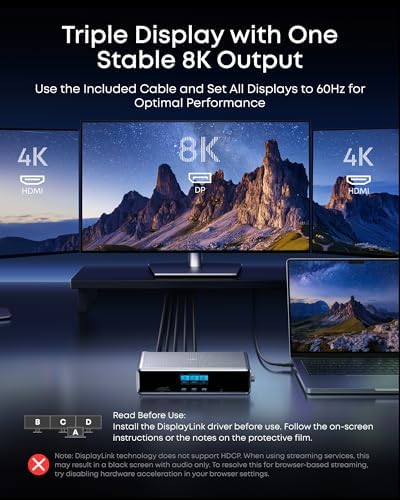
A 14-port DisplayLink dock that runs triple 4K@60Hz displays, delivers 140W charging, and adds a smart status display — ideal for Windows hot-desking setups.
Price may vary. As an affiliate, we earn from qualifying purchases.
What we like
- Drives three 4K@60Hz displays on laptops that normally can't
- 140W upstream charging covers most 14- and 16-inch laptops
- Smart display shows charging, fan, and port status at a glance
- Active cooling fan keeps it stable under sustained load
Could be better
- Requires DisplayLink driver — not native DisplayPort Alt Mode
- DisplayLink adds CPU overhead and isn't ideal for gaming or color-critical work
- Mac users on Apple Silicon need to install third-party software
- Pricey for a non-Thunderbolt dock
Full Review
The Anker Prime DL7400 is built for a specific kind of buyer: someone who needs triple 4K monitors from a laptop that can’t natively drive them. It uses DisplayLink rather than Thunderbolt or DisplayPort Alt Mode, which is both its superpower and its biggest caveat. If your laptop has limited video output — common on Windows ultrabooks and any MacBook Air — this dock unlocks a multi-monitor setup that hardware alone wouldn’t allow.
Build and the Smart Display
The chassis is dense aluminum with a small color display on top showing live charging wattage, fan mode, and port activity. It’s genuinely useful at a hot desk where you want to confirm your laptop is pulling full power without digging into settings. The integrated fan is audible under load but never obnoxious, and it does keep the dock from getting hot the way passive 140W docks tend to.
Ports and Charging
Fourteen ports is a lot, and Anker spread them sensibly: a 140W upstream USB-C, two 100W 10Gbps USB-C ports, one 100W 5Gbps USB-C, two HDMI, one DisplayPort, three USB-A, 2.5Gbps Ethernet, headphone jack, and SD/TF slots. The 140W upstream is enough for almost any 14-inch laptop and most 16-inch models, though gaming laptops will still want their barrel charger.
The DisplayLink Tradeoff
DisplayLink is software-driven video over USB. It works, and triple 4K@60Hz really does run smoothly for normal desktop use — browsing, documents, video calls, even 1080p video playback. But it taxes the CPU, introduces a few extra milliseconds of latency, and isn’t suitable for gaming or color-accurate creative work. If those matter to you, a Thunderbolt dock like the CalDigit TS4 or Anker’s own Prime TB5 is the better buy, even at a higher price.
Who Should Buy This
Buy the DL7400 if you’re on a Windows laptop with only one or two video outputs and need three external monitors for productivity work. It’s also a reasonable pick for MacBook Air users who can tolerate installing DisplayLink Manager. If your laptop already has Thunderbolt 4 or 5 and you do any gaming or color-critical work, skip this and spend up for a native Thunderbolt dock instead.


