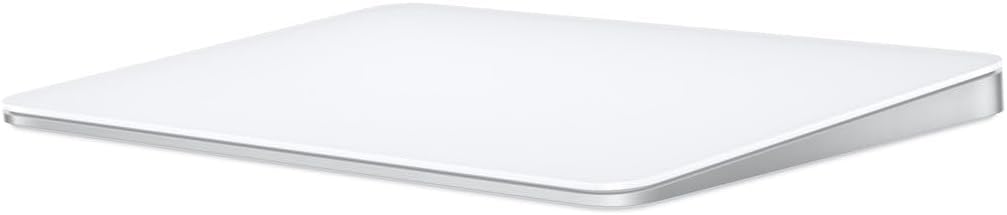
Apple Magic Trackpad (USB-C, 2nd Gen)
The only pointing device that fully unlocks macOS gestures — and USB-C finally fixed the one design flaw that made the old model embarrassing.
Price may vary. As an affiliate, we earn from qualifying purchases.
What we like
- Unmatched macOS gesture support — Mission Control, Spaces, and pinch-to-zoom feel native
- USB-C charging finally replaces the upside-down Lightning port
- Huge edge-to-edge glass surface with precise Force Touch and haptics
- About a month of battery per charge
Could be better
- Still useless for Windows and Linux beyond basic cursor control
- $129 is steep next to a comparably capable mouse
- Flat surface is fatiguing for long click-and-drag sessions
Full Review
The Magic Trackpad has always been the strange one in Apple’s accessory lineup — expensive, polarizing, and quietly essential to anyone who works in macOS all day. The 2nd-gen USB-C version doesn’t reinvent it. It just removes the one reason it was hard to recommend.
USB-C Fixes the Unforgivable Flaw
The previous model charged through a Lightning port on the bottom of the trackpad, meaning you had to flip it over and lay it on its face to charge. It was a punchline. The USB-C version puts the port on the back edge and lets you keep working while it tops up. That’s it — that’s the change everyone wanted, and it’s the reason to buy this revision instead of hunting a discounted older one.
The Gestures Are the Whole Point
A trackpad isn’t a mouse alternative; it’s a different category of input. Three-finger swipe up for Mission Control, swipe sideways to fly between Spaces, pinch to zoom, two-finger scroll with real momentum — these are baked into macOS and a mouse simply cannot replicate them. If your day is a constant shuffle of full-screen apps, browser tabs, and split-screen windows, the Magic Trackpad turns navigation into muscle memory. The Force Touch surface and haptic click are still the best in the business, with no dead corners.
Where It Falls Short
On Windows or Linux it degrades to a basic cursor pad with broken or missing gestures — don’t buy it for a PC. The flat glass surface also gets tiring during long click-and-drag work like photo editing or timeline scrubbing, where a contoured mouse wins on comfort. And at $129 it costs more than mice that do more on paper.
How It Compares
If you work in Windows or do click-heavy, precision-drag work, the Logitech MX Master 3S is the smarter buy — better ergonomics, programmable buttons, and cross-platform reliability. If you’re choosing between this and the Apple Magic Mouse, the trackpad wins outright: the Magic Mouse has worse ergonomics, a fraction of the gesture vocabulary, and the same buried charging port problem this model just solved. Many power users keep both a trackpad and a mouse and switch by task.
Who Should Buy This
Buy it if you live in macOS and want gesture-driven navigation that no mouse can match — especially if you lean on Mission Control and Spaces. Skip it if you’re on Windows, do long drag-heavy editing, or just want a pointer to move the cursor. For the right Mac user, it’s a genuine productivity multiplier; for everyone else, it’s an expensive flat slab.