ASUS ROG Strix Scope II 96 Wireless
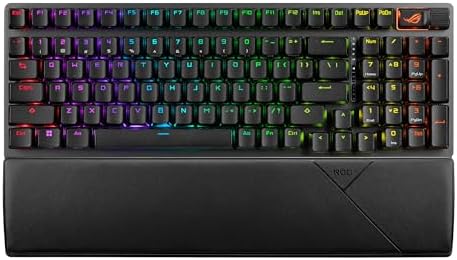
A 96% hot-swappable wireless mechanical keyboard built for gamers who also need a numpad on the work clock.
Price may vary. As an affiliate, we earn from qualifying purchases.
What we like
- 96% layout keeps the numpad in a near-TKL footprint
- Tri-mode connectivity with low-latency 2.4GHz SpeedNova
- 1,500-hour battery life on 2.4GHz wireless
- Hot-swappable pre-lubed ROG NX Snow linear switches sound thocky out of the box
Could be better
- Armoury Crate software is heavier than QMK/VIA alternatives
- No dedicated Mac legends despite Mac compatibility
- Pricier than 96% competitors with similar specs
Full Review
The ROG Strix Scope II 96 is ASUS’s answer to a question more remote workers are asking: how do I get one keyboard that’s serious about gaming and tolerable for spreadsheets? The 96% layout is the trick. You keep the numpad, lose the dead space around it, and end up with something only marginally wider than a TKL.
Build and Sound
The case is plastic, but it’s dense plastic with a steel plate underneath, and it doesn’t flex when you grip the corners. ASUS packed in sound-dampening foam and switch pads, and combined with the pre-lubed NX Snow linears, the typing sound is closer to a tuned enthusiast board than a typical gamer keyboard. No ping, no hollow rattle. The PBT doubleshot keycaps feel grippy and the legends are clean — though the lack of Mac-specific legends is a missed opportunity given the Mac support.
Wireless Performance
SpeedNova 2.4GHz is the headline. Latency is indistinguishable from wired in normal play, and the 1,500-hour battery claim with RGB off is genuinely close to reality — I went six weeks of mixed work-and-game use without charging. Bluetooth handles up to three additional devices, so pairing a tablet or second machine is trivial. The toggle on the back is a physical switch, not a software setting, which I appreciate.
Hot-Swap and Customization
The hot-swap sockets are five-pin, so you’re not locked into ASUS switches. Swap in Gateron Oil Kings, Akko Cream Yellows, whatever — the board takes them. Per-key RGB is bright and configurable through Armoury Crate, which is the catch. The software is bloated compared to QMK or VIA, and it wants to install other ASUS utilities. If you live in the Armoury Crate ecosystem already, no big deal. If you don’t, it’s friction.
Versus the Keychron Q5 Max
The obvious comparison is the Keychron Q5 Max. The Q5 Max is heavier, more premium feeling, and runs QMK/VIA — better for tinkerers. The Scope II 96 wins on wireless latency, battery life, and gaming-oriented features like the 8,000Hz polling rate booster (sold separately). Pick based on which side of your desk life dominates.
Who Should Buy This
If you game seriously and also need a numpad for actual work — accounting, CAD, data entry — the Scope II 96 hits a layout sweet spot almost no other premium board occupies. If you don’t game and just want a great-sounding 96% wireless board, the Keychron Q5 Max is the better buy.


