CalDigit TS5 Thunderbolt 5 Dock
CalDigit's mid-tier Thunderbolt 5 dock packs 15 ports, 140W charging, and dual 8K support into the same rock-solid chassis that made the TS4 famous.
Price may vary. As an affiliate, we earn from qualifying purchases.
What we like
- True 140W host charging — no throttling when downstream devices draw power
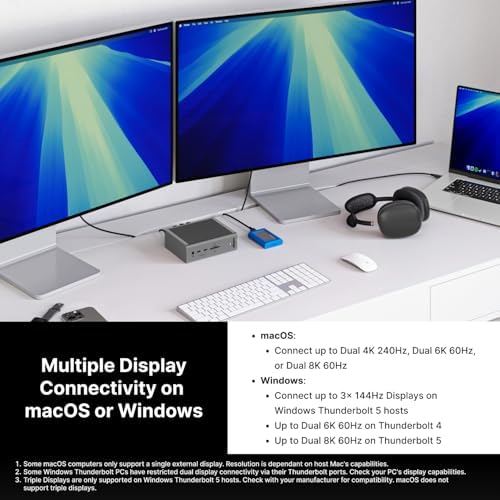
- Four 80Gb/s Thunderbolt 5 ports unlock dual 8K@60Hz or 4K@240Hz displays
- SD 4.0 and microSD UHS-II card readers transfer at full speed
- Same heavy aluminum build and braided 1m cable as the TS4
Could be better
- $400 is a $100 premium over the TS4 for benefits most users can't yet exploit
- Still 2.5GbE — if you want 10GbE you have to step up to the TS5 Plus
- Only two USB-A ports may force a hub for legacy peripheral-heavy desks
Full Review
The TS5 is CalDigit’s answer to a tricky question: how do you follow up the TS4, arguably the best Thunderbolt dock ever made, when most people don’t actually need Thunderbolt 5 yet? The answer is a careful, conservative upgrade that bumps charging to 140W, adds four TB5 ports, and otherwise leaves the proven formula alone.
What You Actually Get Over the TS4
The headline upgrades are real but narrow. You get 140W of host charging instead of 98W, which finally lets a 16-inch M4 Max MacBook Pro charge at full speed under sustained load. You get four 80Gb/s Thunderbolt 5 ports instead of three TB4 ports, which matters if you run dual 8K displays, a 4K@240Hz gaming monitor, or chain a TB5 NVMe enclosure that can saturate the link. SD card support jumps to SD 4.0 (UHS-II stays the practical ceiling on microSD).
What you don’t get: 10GbE (still 2.5GbE), more USB-A ports, or any meaningful change to the chassis. Side-by-side with a TS4, only the badge gives it away.
Real-World Performance
Build quality is identical to the TS4 — milled aluminum, no fan whine, no buzz, no thermal throttling. The 240W power supply is a brick but ensures the dock never has to choose between charging your laptop and powering your accessories. Front-port access is good: SD, microSD, USB-C with 20W PD, USB-A, and a headphone jack are all up front where they belong.
The 2.5GbE port is the one spec that feels stuck in the past at this price, especially when the TS5 Plus offers 10GbE for another $100.
Is TB5 Worth the Upgrade?
For most M4 MacBook Pro owners running a single 4K or 5K display, no. A TS4 still does that job perfectly and saves you $100. The TS5 makes sense in three scenarios: you charge a 140W-class laptop and want full speed, you run dual 8K or high-refresh-rate displays, or you want to keep the dock for the next 5–7 years and not have it bottleneck future TB5 SSDs and monitors.
If you want every port and 10GbE, step up to the TS5 Plus. If you’re TB4-bound and want to save money, the TS4 is still in stock and excellent.
Who Should Buy This
Buy the TS5 if you’ve got an M4 Pro or Max MacBook Pro that pulls 140W, you’re planning to add an 8K or 4K@240Hz display in the next year or two, and you want a dock you won’t have to replace when TB5 peripherals become normal. If your setup is one 4K monitor and a keyboard, save your money and buy a TS4 — or wait for the inevitable price drop on the TS5 next holiday season.


