FlexiSpot E9 Electric Standing Desk
FlexiSpot's quick-install single-motor desk that slots between the budget EC1 and flagship E7 — the right pick if you want memory presets and fast assembly without paying dual-motor money.
Price may vary. As an affiliate, we earn from qualifying purchases.
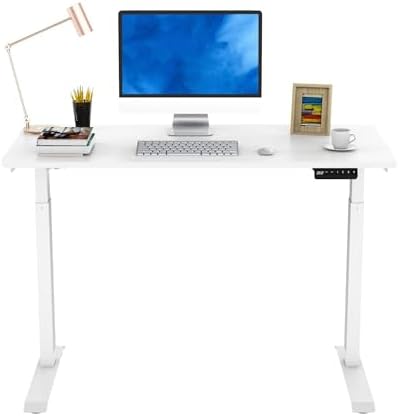
What we like
- Quick-install design genuinely takes under 10 minutes — frame ships pre-assembled
- Memory controller with four programmable height presets
- Whole-piece 48x24 desktop, no seam down the middle
- Significantly cheaper than the dual-motor E7
Could be better
- Single motor is slower (1.0 inch/sec) and louder than the E7's dual setup
- 110 lb weight capacity is lower than the E7's 355 lb rating
- Only one size option — no 55- or 60-inch top available
- Anti-collision works but is less sensitive than premium FlexiSpot frames
Full Review
The E9 is FlexiSpot’s answer to a specific complaint: standing desk assembly is miserable. Most desks ship in two heavy boxes with a 40-step manual and bags of identical-looking screws. The E9 ships pre-assembled — you bolt the legs to the underside of the one-piece top, plug in the controller, and you’re done.
That convenience comes with tradeoffs. This is a single-motor desk with a 110 lb capacity, which puts it firmly in upgrade-from-budget territory rather than competing with flagship models.
Quick-Install Design Actually Works
Most “easy assembly” claims are marketing. The E9’s isn’t. The crossbar, motor, and control box arrive bolted to the desktop. You attach two leg columns, four feet, and the controller — that’s the entire build. I’ve assembled enough standing desks to know this is a real improvement, not a half-step.
The whole-piece 48x24 desktop is the other reason. No seam means no alignment issues and a cleaner look than seamed budget tops.
E9 vs E7 — Where the Money Goes
This is the question most buyers are really asking. The FlexiSpot E7 has dual motors, a 355 lb capacity, multiple desktop size options, and lifts faster and quieter. It’s also $200+ more depending on configuration.
If your setup is a monitor or two, a laptop, and the usual desk junk, you’ll never approach the E9’s 110 lb limit. If you’re stacking a 49-inch ultrawide, an audio interface, studio monitors, and a full keyboard tray — go E7. The single motor is also noticeably louder during height changes, though it’s not obnoxious.
Where It Sits in the Lineup
Above the FlexiSpot EC1, which is the true budget option (no memory presets, slower frame, more assembly). Below the E7, which is the no-compromise pick. The E9’s job is to give you memory presets and fast install at a price point closer to the EC1.
Who Should Buy This
Buy the E9 if you want a no-fuss single-monitor or dual-monitor home office desk and don’t want to spend a Saturday assembling a frame. Skip it if you have a heavy setup, want a desktop wider than 48 inches, or already have the budget for the E7 — the dual-motor upgrade is worth it for daily use over years.