iVanky FusionDock Ultra 26-in-1 Thunderbolt 5 Dock
The maxed-out Thunderbolt 5 dock for Mac Pro and Studio creators — dual TB5 chips, 26 ports, 240W PD, and 10GbE, but it will not work with Windows at all.
Price may vary. As an affiliate, we earn from qualifying purchases.
What we like
- Dual TB5 controllers deliver true 120Gbps without bandwidth contention between displays and storage
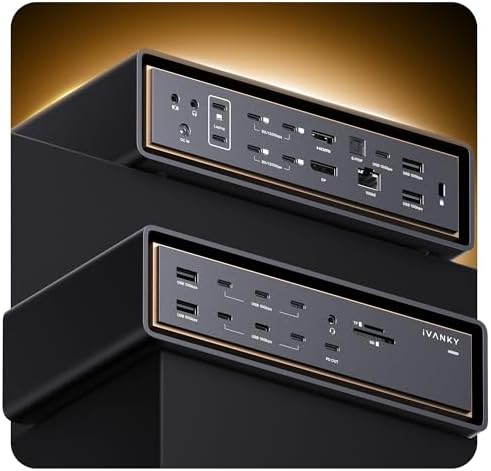
- 26 ports cover essentially every workflow — quad 6K or triple 8K displays, 4 downstream TB5, 10GbE
- 240W power delivery handles the M4 Max MacBook Pro 16 under sustained load
- Adaptive twin-fan cooling keeps the dock from throttling during long export sessions
Could be better
- Completely incompatible with Windows — Mac only, no exceptions
- $649 puts it well above mainstream TB5 docks
- Large desktop footprint and active fans you can hear in a silent room
Full Review
The FusionDock Ultra is iVanky’s no-compromise answer for Mac creators who already own a Mac Pro, Mac Studio, or M4/M5 Max MacBook Pro and need to attach everything at once. Two Thunderbolt 5 controllers, 26 ports, 240W of power, 10-gig Ethernet, and enough display bandwidth for triple 8K. Macworld called it “formidable” and that’s the right word — this is a workstation dock, not a travel hub.
Why Dual TB5 Chips Actually Matter
Most Thunderbolt 5 docks share a single 120Gbps pipe across every port. Plug in two 6K displays plus a fast NVMe array and you start seeing bandwidth squeeze. The FusionDock Ultra splits the load across two independent TB5 controllers, so a quad-monitor video editor pulling proxies off external SSDs doesn’t watch frame rates dip when a render kicks off. For ProRes timelines and multi-cam edits, this is the difference between “works” and “works without thinking about it.”
The 26 Ports, And Why You Might Actually Use Them
10GbE alone justifies a chunk of the price for anyone on a wired creative network or pulling from a NAS. Add four downstream TB5 ports, multiple USB-C and USB-A, full-size SD and microSD card readers, dedicated audio in/out, and DisplayPort, and you’ve replaced an entire breakout panel. The 240W upstream PD means even a fully loaded MacBook Pro 16 stays charged under sustained CPU and GPU load — no battery drain during four-hour exports.
The Mac-Only Catch
This is the buying constraint. The FusionDock Ultra is explicitly incompatible with Windows. Not “limited support,” not “reduced ports” — it will not work. iVanky engineered the dual-chip architecture around Apple’s Thunderbolt implementation. If there’s any chance you’ll switch to a Windows workstation or share the dock with a PC, stop reading and look at the Kensington EQ Pro instead.
How It Compares
The Kensington EQ Pro is the universal alternative — fewer ports, lower display ceiling, but it works on anything. The Anker Prime TB5 is roughly half the price with fewer ports and single-chip bandwidth, which is fine for one or two displays but not a creator workstation. The FusionDock Ultra only makes sense if you’re maxing out a high-end Mac and willing to pay for headroom.
Who Should Buy This
Buy this if you run a Mac Pro, Mac Studio, or M4/M5 Max MacBook Pro as your daily workstation, need three or more high-resolution displays, and want 10GbE plus enough downstream TB5 to feed external storage arrays. If you’re on Windows, switching platforms in the next two years, or only running a single 4K monitor, this is overkill — the Anker Prime TB5 or Kensington EQ Pro will serve you better for less money.


