Keychron K4 Pro 96% Wireless Mechanical Keyboard
A 96% layout that keeps the numpad without going full-size, with hot-swap, QMK/VIA, RGB, and Bluetooth at a budget-friendly price.
Price may vary. As an affiliate, we earn from qualifying purchases.
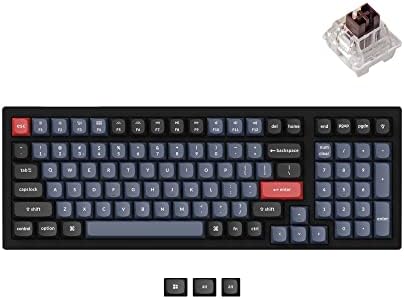
What we like
- 96% layout keeps the numpad in a smaller footprint than full-size
- Hot-swappable PCB works with most 3-pin and 5-pin MX-style switches
- QMK/VIA support for full key remapping and macro programming
- Triple-mode connectivity: Bluetooth 5.1, 2.4GHz dongle equivalent via wired USB-C, three-device pairing
- Screw-in PCB stabilizers cut down on rattle out of the box
Could be better
- Plastic case feels less premium than the aluminum Q-series
- OSA profile keycaps are taller than typical low-profile boards
- RGB lighting bleeds around the keycaps more than gasket-mounted boards
Full Review
The K4 Pro fills an awkward layout gap. If you’ve used a 75% board and missed the numpad, or run a full-size and resented the wasted space, 96% is the answer. Keychron has had a 96% in the lineup for years, but the Pro version is the one worth buying — hot-swap, QMK/VIA, and screw-in stabilizers turn it from a budget board into something genuinely customizable.
Layout and Build
The 96% layout crams a numpad, arrow cluster, and function row into a footprint barely larger than a TKL. You lose a little dead space between blocks — F-keys sit flush against numbers, arrows tuck into the bottom-right corner — but everything you’d reach for on a full-size is still there. The case is plastic with an aluminum top frame on some variants, and while it doesn’t have the heft of the Q5 Max, it doesn’t flex when you type, either.
Typing Feel
K Pro switches are Keychron’s house-brand Gateron variants, and they’re competent if not exciting. The Red linears are smooth out of the box, the Browns have a mild tactile bump that’s noticeably lighter than Cherry MX Brown. Screw-in PCB stabilizers are the real win — large keys like spacebar, enter, and the numpad zero feel consistent rather than rattly. If you don’t like the stock switches, the hot-swap PCB takes any 3- or 5-pin MX clone, so swapping to Holy Pandas or Boba U4Ts is a 10-minute job.
Wireless and Software
Bluetooth 5.1 covers three devices with a quick Fn+1/2/3 swap. Wired mode jumps to 1000 Hz polling for low-latency gaming. QMK and VIA support means you can remap every key, build macros, and tune RGB without sketchy proprietary software — VIA’s web app does it all in a browser.
K4 Pro vs Q5 Max
The Q5 Max is the premium 96% in Keychron’s lineup: full aluminum case, gasket mount, 2.4GHz wireless, around $230. The K4 Pro gets you 80% of that experience for $100. If you’re not chasing the best-in-class typing feel and just want a programmable 96% with the numpad you actually use, the K4 Pro is the smarter buy.
Who Should Buy This
Buy the K4 Pro if you want a numpad without the wasted space of a full-size board, you value QMK/VIA programmability, and you don’t need an aluminum case. Spreadsheet-heavy workflows, accountants, and anyone who hates reaching for a separate numpad will get the most out of the layout. If you want the premium build and gasket-mounted typing feel, skip up to the Q5 Max instead.


