Keychron Q1 Ultra Wireless Mechanical Keyboard
Keychron's biggest Q-series update yet — a fully wireless 75% aluminum board with 8000Hz polling and enthusiast-grade build quality at half the price of a custom.
Price may vary. As an affiliate, we earn from qualifying purchases.
What we like
- Full CNC aluminum body feels like a $400 custom board
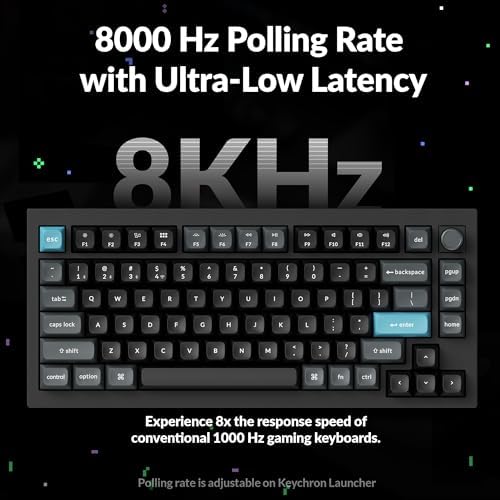
- 8000Hz polling rate in wired and 2.4GHz modes
- Triple connectivity: 2.4GHz, Bluetooth 5.2, and USB-C
- 4000mAh battery lasts weeks on a single charge
- Gasket-mounted with hot-swap sockets and south-facing RGB
- QMK/VIA support for deep customization
Could be better
- Heavy — over 4 lbs, not meant to travel
- $229 is a jump from the Q1 Pro
- Volume knob replaces a key on some firmware layouts
Full Review
The Q1 Ultra is what Keychron fans have been waiting three years for. The Q1 Pro brought wireless to the Q-series, but it felt like a stopgap — decent polling rates, mediocre battery, no real flagship story. The Ultra closes that gap. It’s a full-aluminum, gasket-mounted 75% board with 8000Hz polling and a battery that actually lasts, priced at $229 instead of the $400+ you’d pay for a comparable custom.
Build and Feel
Pick one of these up and you’ll understand the weight complaint — it’s 4.4 lbs of CNC aluminum, and it does not move on the desk. The gasket mount gives the typing feel a slight bounce without the mushiness some early gasket boards had. The stock stabilizers are lubed from the factory and rattle-free, which is unusual at this price. KSA profile PBT keycaps have a bit more sculpt than the standard OEM profile — they take a day to adjust to if you’re coming from Cherry profile, but they feel great once you do.
Wireless and Polling
This is the headline feature. 8000Hz polling in both wired and 2.4GHz modes puts it in the same tier as dedicated gaming boards, and in practice it feels noticeably snappier than the 1000Hz most keyboards ship with. Bluetooth drops to 125Hz but that’s fine for travel and office use. Battery life is genuinely strong — I got about two and a half weeks of daily mixed use with RGB at low brightness before needing to charge. Kill the RGB entirely and you can stretch that to well over a month.
Customization
QMK/VIA is unchanged from the rest of the Q-series, which is the right call. Remap keys, build macros, and program the rotary knob in a browser window without flashing firmware. Hot-swap sockets mean you can drop in any 3-pin or 5-pin MX-style switch, and the south-facing RGB plays nice with Cherry-profile keycaps if you ever swap the KSA set off.
Who Should Buy This
Get the Q1 Ultra if you want a true enthusiast-tier 75% keyboard but don’t want to spend $400+ on a custom group buy or deal with soldering. It’s the best build-quality-per-dollar wireless board on the market right now. If you don’t care about 8000Hz polling or wireless and want to save $100, the original Q1 (wired) is still excellent. If you want something lighter for travel, look at the Keychron K3 Pro instead — the Ultra is a desk board, not a backpack board.


