Keychron Q6 Max Wireless Mechanical Keyboard
Keychron's full-size Q-series flagship — gasket-mounted, QMK/VIA, triple-mode wireless with a numpad and knob for spreadsheet and CAD power users.
Price may vary. As an affiliate, we earn from qualifying purchases.
What we like
- Full 104-key layout with dedicated numpad and programmable knob
- Heavy gasket-mounted aluminum build with excellent typing acoustics
- QMK/VIA support with 1000Hz polling on 2.4GHz and wired
- Hot-swappable PCB accepts almost any 3-pin or 5-pin MX switch
Could be better
- Eats serious desk real estate — pushes your mouse far right
- 5+ lb weight makes it a poor travel keyboard
- Significantly more expensive than the V6 Max with similar internals
Full Review
The Q6 Max is the Q1 Max stretched out to a full 104-key layout with a numpad and knob bolted onto the right side. Same gasket-mounted aluminum case, same Gateron Jupiter switches, same QMK/VIA firmware, same triple-mode wireless. If you’ve used a Q1 Max, you already know how this types — the question is whether you actually need the extra column of keys.
Build and Typing Feel
The double-gasket mounting and silicone dampening give the Q6 Max that deep, thocky sound profile Keychron has built its reputation on. The case is solid CNC aluminum with a brushed finish, and at 5.27 lbs it isn’t moving anywhere. Double-shot PBT keycaps in OSA profile feel substantial under the fingers and won’t develop shine.
Out of the box on Gateron Jupiter Browns, the typing experience is closer to a $300+ custom build than a mainstream production keyboard. Stabilizers are pre-lubed and don’t rattle — a real upgrade from older Keychron releases.
Wireless and Software
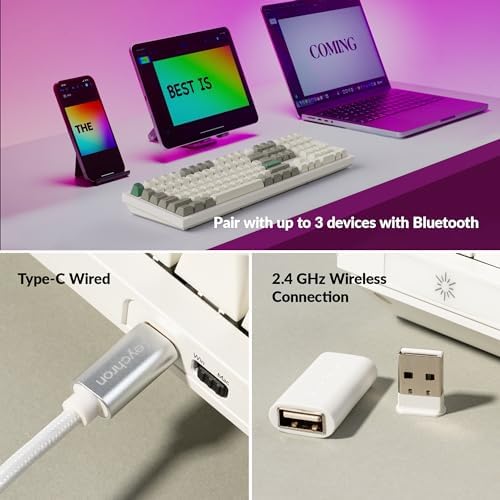
You get 2.4GHz with 1000Hz polling, Bluetooth 5.1 across three devices, and USB-C wired mode. Bluetooth drops to 90Hz, which is fine for typing but not gaming. QMK and VIA support is the headline feature — you can remap every key, build macros, and tune the knob’s behavior per layer without flashing firmware.
Q6 Max vs Q1 Max — Who Needs the Numpad
The Q1 Max already covers 75% of what most people need: arrow keys, function row, and a knob in a compact footprint. The Q6 Max adds the numpad and a few navigation keys, and that’s the entire pitch. If you do data entry, accounting, CAD work, or 3D modeling where the numpad is muscle memory, the upgrade is obvious. If you don’t, the Q1 Max gives you the same typing feel for $40 less and leaves room for your mouse to live closer to home position.
The desk-space tradeoff is real. A full-size board pushes your mouse roughly 6 inches further right, which over an eight-hour day is a measurable shoulder strain difference. Worth thinking about before defaulting to full-size out of habit.
Who Should Buy This
Buy the Q6 Max if you genuinely use a numpad daily and want a Keychron flagship that won’t compromise on build or features. If you mostly type and occasionally need numbers, the Q1 Max is the smarter buy. If you want the same layout for less money, the V6 Max gives you 90% of the experience in a plastic case for around $130.


