Logitech Signature Slim MK955 Keyboard + Mouse Combo
A full-size, whisper-quiet wireless keyboard and mouse combo that brings MX-adjacent comfort to shared offices and home setups.
Price may vary. As an affiliate, we earn from qualifying purchases.
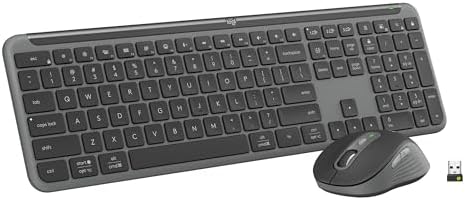
What we like
- Genuinely quiet typing — safe for video calls and shared rooms
- Logi Bolt receiver plus Bluetooth, switch across three devices
- Full-size layout with number pad, no compromises for spreadsheets
- 62% post-consumer recycled plastic in the keyboard
Could be better
- Membrane feel — typing enthusiasts will miss MX Keys' scissor crispness
- M750L mouse is good, not great — no MagSpeed scroll wheel like the MX Master 3S
- AA/AAA batteries instead of rechargeable USB-C
Full Review
The MK955 is what happens when Logitech takes the productivity DNA of the MX line and softens it for the cubicle. It’s quieter, cheaper, and a little less precise — and for a huge chunk of remote workers, that’s exactly the right trade.
Typing Feel vs MX Keys S
The Signature Slim keyboard uses a low-profile membrane stack rather than the scissor switches in the MX Keys S. Side by side, the MX Keys feels crisper and more deliberate — there’s a subtle click at the bottom of each press that the MK955 lacks. The MK955 trades that for a softer, dampened landing that’s noticeably quieter on calls.
For long writing sessions I still prefer MX Keys S. For accounting work, customer-facing Zoom calls, or any setup where someone else is in the room, the MK955 is better. The layout is full-size with a proper number pad — no tenkeyless compromises.
Silent Click M750L vs MX Master 3S
The included M750L is the larger sibling of the M650, with SilentTouch left and right buttons that genuinely live up to the name. Compared to the MX Master 3S, you lose the MagSpeed electromagnetic scroll wheel, the thumb scroll, the gesture button, and a bit of palm support. The M750L’s scroll is a normal ratcheted wheel — fine, not magical.
What you keep: the same Logi Options+ software, the same multi-device pairing, and the same near-silent clicks. If you don’t spend your day scrolling 10,000-row spreadsheets, you won’t miss MagSpeed.
Office Noise Level
This is the real selling point. Between the dampened keys and the SilentTouch buttons, the MK955 is the quietest full-size combo Logitech makes. In a back-to-back test against an MX Keys S + MX Master 3S setup, the MK955 is roughly half the volume during normal typing and clicking — close to silent on a soft desk mat.
If you’ve ever had a coworker complain about your keyboard on standup calls, this fixes it.
Multi-Device and Software
Easy-Switch buttons let you flip between three paired devices instantly — work laptop, personal MacBook, iPad. Logi Bolt is the modern, more secure successor to Unifying receivers, and Bluetooth works for everything else. Logi Options+ handles per-app remapping, smart actions, and Flow (cursor across machines).
The one ergonomic miss: AA and AAA batteries instead of a built-in rechargeable cell. Battery life is excellent (3 years for the keyboard, 2 for the mouse), but in 2026 a USB-C port would feel more current.
Who Should Buy This
Buy the MK955 if you want full-size MX-adjacent productivity at half the price, and quiet matters more than typing feel. It’s ideal for shared offices, open-plan setups, and anyone who lives on video calls. If you’re a writer or developer who wants the best typing experience Logitech makes, spend up for the MX Keys S + MX Master 3S combo instead — you’ll feel the difference every day.


