Logitech Spotlight Presentation Remote
A premium wireless presenter with on-screen spotlight and magnify tools that actually changes how you present over video calls.
Price may vary. As an affiliate, we earn from qualifying purchases.
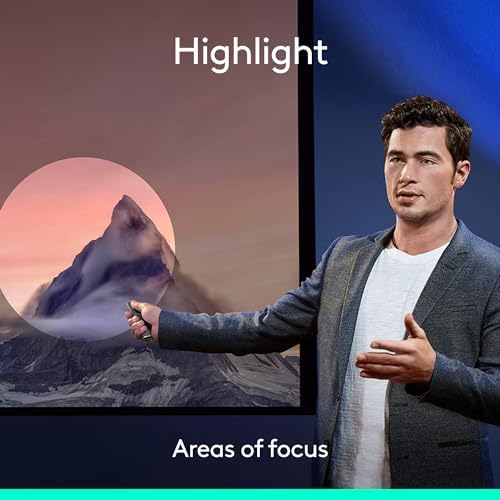
What we like
- Digital spotlight and magnify work over video calls and shared screens
- Works with PowerPoint, Keynote, Google Slides, PDF, and Prezi
- Three-month battery life with one-minute quick charge for 3 hours of use
- Bluetooth and USB receiver both included
Could be better
- Expensive compared to basic clickers that just advance slides
- Logi Options+ software setup is required to unlock the best features
- No physical laser pointer for in-room presentations
Full Review
The Logitech Spotlight is the only presentation remote I’d recommend to anyone who presents on Zoom, Google Meet, or Teams more than once a week. The killer feature isn’t the click — it’s the digital spotlight and magnifier that actually appear inside your shared screen, where attendees can see them.
Traditional laser pointers are useless on video calls. Nobody on the other end sees the red dot. The Spotlight solves that by overlaying a soft digital spotlight on your slide that follows your hand movement, and a magnifier that zooms in on whatever you’re highlighting. It’s the difference between gesturing at the wall behind you and actually directing attention.
Build and Feel
The aluminum body is dense and weighty in a good way — closer to a premium pen than a plastic clicker. Three buttons handle everything: forward, back, and the spotlight trigger. The middle button is customizable through Logi Options+ for things like blanking the screen or starting a timer. After a week of use, the button placement becomes muscle memory.
The Software Matters
You need Logi Options+ installed to get the spotlight, magnifier, vibration timer alerts, and custom button mapping. Without it, the Spotlight is just an expensive forward/back clicker. Setup takes five minutes and the software is unobtrusive once configured. The timer feature with wrist vibration alerts is genuinely useful for staying on pace without checking a clock.
Battery and Connectivity
A full charge lasts about three months of normal use. When you do forget to charge it, one minute on USB-C gets you three hours — enough to survive any meeting. Pairing works over Bluetooth or with the included USB-A nano receiver, which docks inside the remote when not in use. The Bluetooth connection has been rock solid across multiple laptops.
Who Should Buy This
Buy this if you give frequent video presentations, training sessions, or webinars where you need to direct attention to specific parts of a slide. Sales engineers, consultants, professors teaching remote, and anyone running client demos will get their money’s worth quickly. If you only present in person a few times a year, a $30 Logitech R400 will do everything you need — the Spotlight is overkill.


