Microsoft Arc Mouse
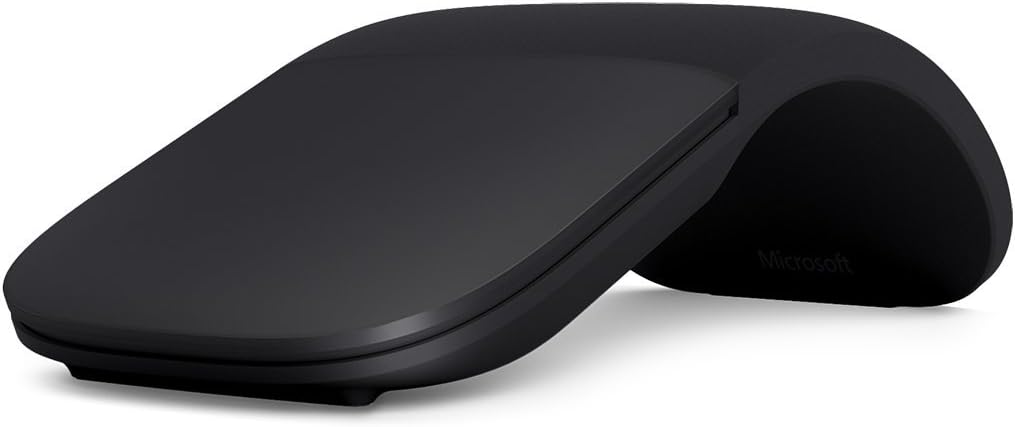
A Bluetooth travel mouse that snaps curved for use and flat for storage — slim, light, and genuinely ergonomic for people who work on the go.
Price may vary. As an affiliate, we earn from qualifying purchases.
What we like
- Snaps flat for effortless bag storage
- Arc shape reduces wrist strain during use
- Bluetooth — no dongle required
- Pairs with up to two devices
- Works on virtually any surface
Could be better
- Touch scroll strip takes getting used to
- No side buttons or dedicated right-click zone
- Not suited for all-day heavy use or gaming
Full Review
The Microsoft Arc Mouse is one of the few travel mice that actually looks intentional rather than compromised. It snaps curved to form an arc that fits your palm when in use, then snaps flat in under a second when you’re done — and that physical snap also toggles the power. No hunting for a switch.
The Arc Shape in Practice
The curved profile positions your hand in a more neutral posture than a flat mouse, and you feel the difference after an hour of use. It’s not a full ergonomic mouse — it won’t replace a Logitech MX Vertical — but it noticeably beats every other travel mouse on comfort. The touch scroll strip runs down the center and mimics a scroll wheel reasonably well, though it takes a session or two to calibrate your sensitivity expectations.
Travel and Portability
At 84g and 11mm thin when flat, the Arc Mouse disappears into a laptop sleeve. There’s no USB dongle to lose — it connects via Bluetooth and can pair to two devices simultaneously. Battery life is rated at six months on two AAAs, and in real use that’s roughly accurate with moderate daily use. The snap-flat power-off means you won’t drain it accidentally in your bag.
What It’s Missing
No side buttons. No adjustable DPI. The right-click zone is the right half of the entire top surface, which works but feels imprecise if you’re used to a defined button. For desk-bound work where you’re in spreadsheets or doing detailed design work all day, look at the Logitech MX Master 3 instead. The Arc Mouse is purpose-built for the laptop-in-a-café, meeting-room-to-meeting-room use case.
Who Should Buy This
The Arc Mouse is for frequent travelers who refuse to compromise on ergonomics. If your mouse lives in a bag more than on a desk, the snap-flat form factor and Bluetooth reliability make it the best option at this size. Surface users get a seamless aesthetic match, but it works equally well with any Windows or Mac laptop.


