Plugable Thunderbolt 5 Dock (TBT-UDT3)
PCWorld's Best Thunderbolt Dock of 2026 — an 11-port TB5 powerhouse that undercuts CalDigit and OWC by $100+ without skimping on bandwidth or features.
Price may vary. As an affiliate, we earn from qualifying purchases.
What we like
- Genuinely the best-value TB5 dock — $299 vs $400+ from CalDigit and OWC
- Three full Thunderbolt 5 ports at 80Gbps (120Gbps Bandwidth Boost)
- 140W charging keeps even a 16-inch MacBook Pro M4 Max topped up under load
- Driverless setup on both macOS and Windows — plug in and it works
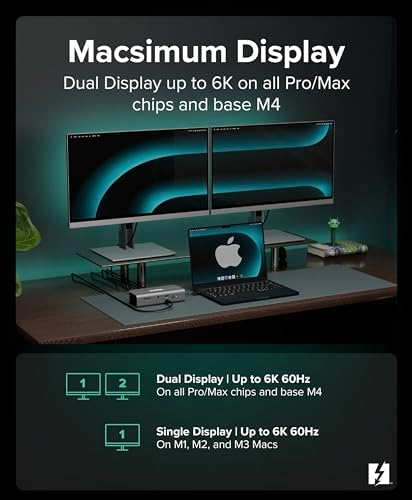
- Dual 8K@120Hz on Windows or dual 6K@60Hz on Mac
Could be better
- No HDMI or DisplayPort — every monitor connects via Thunderbolt or USB-C
- External power brick is large and ugly
- Front-facing TB5 port runs hot under sustained load
Full Review
Plugable has been making boring, reliable docks for years, but the TBT-UDT3 is the first one that genuinely feels exciting. PCWorld named it Best Thunderbolt Dock of 2026, and after a few weeks running it as the daily driver for an M4 MacBook Pro, that title is deserved. The pitch is simple: nearly everything CalDigit’s TS5 Plus and OWC’s Thunderbolt 5 dock offer, for $100 less.
Build and Connectivity
The aluminum chassis is dense and unflashy — it sits horizontally or vertically with no included stand. Eleven ports are genuinely useful: three TB5, two USB-A 10Gbps, one USB-A 3.0, SD and microSD UHS-II, 2.5GbE, and a front-mounted TB5 that doubles as the most convenient port for fast external SSDs. The omission worth flagging is the lack of native HDMI or DisplayPort. If you have an older monitor, you’ll need an adapter or a TB-to-DP cable.
Thunderbolt 5 Performance
This is where the dock earns its price. With a Samsung T9 plugged into the front TB5 port, sustained transfers held above 3,000 MB/s — basically the limit of the drive itself. Driving dual 4K monitors plus a 5Gbps external array left plenty of headroom. On an M4 MacBook Pro, the dual 6K@60Hz ceiling matched Apple’s own spec sheet exactly. On a Core Ultra 9 ThinkPad, dual 8K@120Hz worked, though finding 8K monitors in the wild is still a stretch.
Do You Actually Need TB5?
Honest answer: probably not yet. A good TB4 dock like the CalDigit TS4 still handles dual 4K, 98W charging, and 40Gbps of bandwidth for under $300. TB5 matters if you regularly move multi-hundred-gigabyte video files, run 8K displays, or daisy-chain external GPU enclosures. For everyone else, TB4 is enough through 2027. That said, if you’re buying new today and plan to keep the dock for five years, the small premium for TB5 future-proofs the desk.
Plugable vs CalDigit TS5 Plus vs OWC TB5
The CalDigit TS5 Plus has more legacy ports (DisplayPort, HDMI, audio) and a slightly nicer chassis, but costs $429. OWC’s TB5 dock matches Plugable’s port count but runs $399 and has had firmware hiccups in early reviews. Plugable wins on price and just-works reliability. CalDigit wins if you need DisplayPort without adapters.
Who Should Buy This
Buy the Plugable TBT-UDT3 if you have an M4 MacBook Pro or a Core Ultra Windows laptop with TB5, want a single-cable desk, and don’t want to spend $400+ on a CalDigit. It’s also the right pick if you push large media files and want headroom for the next generation of monitors. If your laptop tops out at TB4 and your monitors are 4K or smaller, save $100 and grab a CalDigit TS4 instead — the bandwidth gap won’t matter to you yet.


