Satechi USB-C Multimedia Adapter
A Mac-native USB-C hub that adds 4K HDMI, mini DisplayPort, Ethernet, USB 3.0, and SD card slots without breaking the MacBook aesthetic.
Price may vary. As an affiliate, we earn from qualifying purchases.
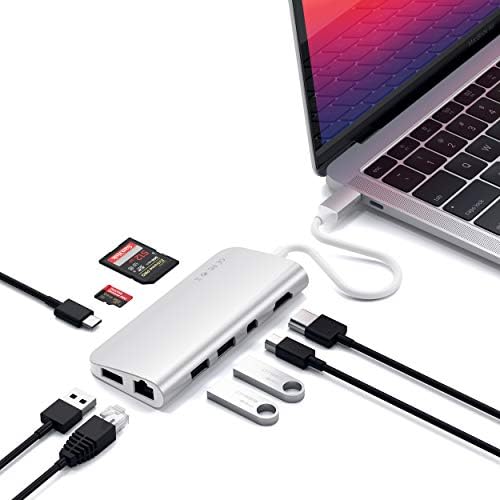
What we like
- Brushed aluminum shell color-matches MacBook Pro and Air perfectly
- Handles 4K HDMI plus Gigabit Ethernet and SD cards in one compact unit
- Dual USB-C connector sits flush against the laptop — no floppy cable
- USB-C PD pass-through keeps the MacBook charging while docked
Could be better
- HDMI tops out at 4K/30Hz — fine for productivity, not gaming
- Expensive compared to generic USB-C hubs with similar port layout
- Hard-wired short cable means you can't extend or replace it
Full Review
The Satechi USB-C Multimedia Adapter is the hub Apple should have shipped with the MacBook. It solves the port problem on M-series MacBooks without looking like an afterthought bolted to your machine.
Build Quality and Design
The shell is anodized aluminum in Space Gray or Silver to match whichever MacBook you own. The finish is dead-on — lay it next to your laptop and it looks like part of the hardware. It’s a small thing, but every other hub I’ve used clashes.
The dual USB-C connector is the standout design choice. Instead of a dangling cable pulling sideways, the hub plugs into both USB-C ports on one side of the MacBook and sits flush. It won’t wobble or get yanked out when you shift the laptop.
Port Layout in Daily Use
You get 4K HDMI, mini DisplayPort, Gigabit Ethernet, three USB 3.0 ports, SD and microSD card slots, and a USB-C PD pass-through. That covers external monitors, wired networking, photo imports, and legacy peripherals in one connection.
HDMI runs at 4K/30Hz, which is the honest limitation here. For spreadsheets, code, and video calls it’s fine. If you’re pushing a 4K gaming monitor at 60Hz, this isn’t the hub for you — you’ll want something with HDMI 2.0 or DisplayPort.
Performance
Ethernet has been rock solid at full gigabit speeds. The SD reader moves files at expected UHS-I speeds. USB 3.0 ports handle external SSDs without issue. PD pass-through delivers up to 60W, which is enough for a 13” MacBook Pro but not ideal for the 16” model under heavy load.
Who Should Buy This
Buy this if you own a MacBook Air or 13/14” MacBook Pro and want a hub that looks like it belongs. It’s the cleanest way to dock a Mac at a desk without a full Thunderbolt station.
If you run a 16” MacBook Pro at full tilt or need 4K/60Hz on an external monitor, step up to a Thunderbolt 4 dock like the OWC Thunderbolt 4 Hub instead. And if aesthetics don’t matter and you just want ports on a budget, generic Anker hubs do the same job for half the price.


