Twelve South MagicBridge
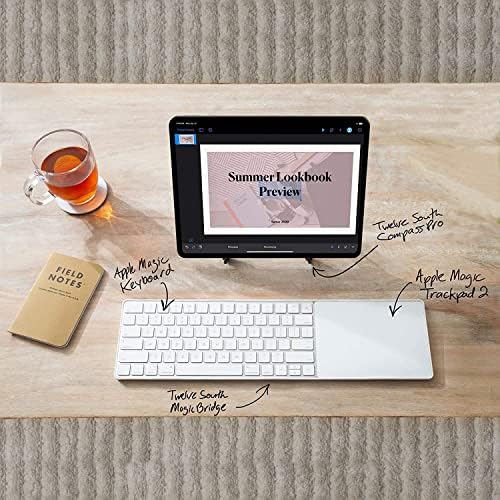
A polycarbonate tray that snaps the Apple Magic Keyboard and Magic Trackpad 2 into a single, lap-friendly control surface.
Price may vary. As an affiliate, we earn from qualifying purchases.
What we like
- Locks keyboard and trackpad into perfect alignment
- Lightweight polycarbonate adds almost no bulk
- Makes lap typing actually viable
- Non-permanent — pops off in seconds when you need to charge or travel
Could be better
- Only fits the Magic Keyboard without numeric keypad (get the Extended for the larger one)
- Trackpad sits to the right by default — lefties will need to swap orientation
- Doesn't work with the Touch ID keyboard's wider footprint variants
Full Review
The MagicBridge solves a problem most Mac users don’t realize they have until they try a couch coding session: the Magic Keyboard and Magic Trackpad slide all over the place when they aren’t anchored to a desk. Twelve South’s fix is a thin polycarbonate sled that the two accessories snap into, turning them into one rigid unit that behaves like a laptop palm rest.
Build and Fit
The tray is a single piece of matte white plastic shaped to the exact contours of Apple’s hardware. Both devices clip in with a satisfying click — no adhesive, no screws — and the fit is tight enough that nothing wiggles loose during use. The polycarbonate is rigid enough to span both devices without flex, but light enough that you barely notice the added weight. It also doesn’t scratch the aluminum bottoms of either accessory, which matters if you ever plan to resell.
Daily Use
On a desk, the MagicBridge mostly fixes the alignment problem — your trackpad stays exactly where you left it relative to the keyboard, even after a week of bumping it around. The bigger win is lap use. Without the bridge, balancing both devices on your thighs is hopeless. With it, you get a single surface that sits flat and lets you type and swipe naturally from the couch, bed, or a recliner. It’s also useful for sliding the whole setup aside when you need desk space for paperwork.
Limitations
The standard MagicBridge only fits the compact Magic Keyboard — the version without a numeric keypad. If you have the larger keyboard with the number pad, you need the MagicBridge Extended, which is a separate SKU. There’s also no left-handed configuration out of the box, though some users disassemble and re-clip the trackpad on the opposite side. If you’re using the newer Touch ID Magic Keyboard with Numeric Keypad, double-check fit before buying — Twelve South updated the Extended for it, but the standard tray may not match newer footprints exactly.
Who Should Buy This
Anyone who pairs a Magic Keyboard with a Magic Trackpad 2 and works away from a fixed desk — couch, bed, lap, recording booth — should just buy this. It’s $40 for a problem-solver that does one thing well. If you only ever use your keyboard and trackpad on a flat desk and don’t mind realigning them occasionally, you can skip it. Pair it with the Apple Magic Keyboard with Touch ID for a wireless desktop input setup that travels between rooms without falling apart.


