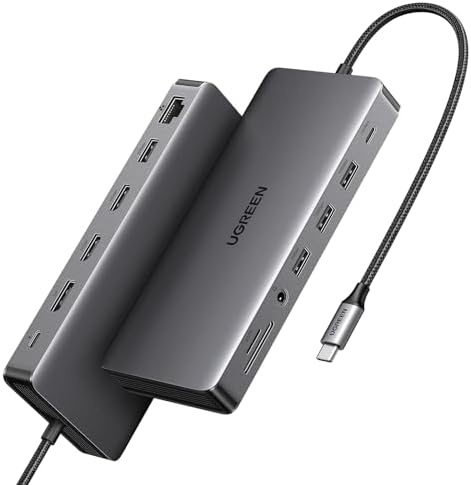
UGREEN Revodok Pro 313 USB-C Docking Station
A 13-in-1 USB-C dock with dual 4K HDMI, DisplayPort, Gigabit Ethernet, 100W passthrough, and a card reader — the best-value full-featured dock for non-Thunderbolt MacBooks and Windows laptops.
Price may vary. As an affiliate, we earn from qualifying purchases.
What we like
- Dual 4K HDMI outputs at 60Hz work flawlessly with most USB-C laptops
- 100W Power Delivery keeps even power-hungry laptops charged while docked
- SD and microSD card slots save a separate reader
- 13 ports in a compact, desk-friendly footprint
- Significantly cheaper than comparable Thunderbolt docks
Could be better
- USB-C (not Thunderbolt) — bandwidth limitations appear when running dual 4K + USB-A simultaneously
- Runs warm under heavy load, especially with multiple high-bandwidth ports active
- Runs warm under heavy load — don't stack or bury it under cables
Full Review
The UGREEN Revodok Pro 213 hits a sweet spot that’s hard to find at this price: a genuinely full-featured dock that doesn’t ask you to compromise on port count, resolution, or charging. At under $90, it’s the dock to buy if you don’t need Thunderbolt 4 and don’t want to pay for it.
Ports and Connectivity
Thirteen ports is a lot to pack into a device this size — and UGREEN mostly pulls it off. You get two HDMI 2.0 outputs capable of 4K at 60Hz each, a DisplayPort 1.4 for triple-display setups, two USB-A 3.2 Gen 2 ports, two USB-A 3.0 ports, a USB-C data port, Gigabit Ethernet, 100W PD passthrough, and both SD and microSD card slots. That card reader alone eliminates a common desktop accessory, and the built-in Ethernet means wired network connections don’t consume a USB port.
Performance in Practice
Running dual 4K monitors with a few USB peripherals attached is where this dock earns its price. On M2/M3 MacBooks (non-Pro/Max) and modern Windows laptops with USB-C 3.2 Gen 2, both screens hold steady at 60Hz without frame drops or flickering. Push it harder — dual 4K plus a fast SSD in the USB-C data port — and you’ll occasionally see USB bandwidth contention. That’s a USB protocol ceiling, not a UGREEN problem, but it’s worth knowing before you buy.
Build Quality and Heat
The aluminum chassis feels solid and premium for the price point. It doesn’t rattle, and the cable is braided. The dock does get noticeably warm after an hour of dual-monitor use with a device charging at 100W — warm to the touch but never hot. Ventilation is passive, so placing it flat on the desk with airflow underneath helps. Don’t bury it under cables.
Who Should Buy This
Buy the Revodok Pro 313 if you have a USB-C laptop (MacBook Air, Dell XPS, Surface, or similar) and want a clean single-cable desk setup with dual monitors, Gigabit Ethernet, and reliable 100W charging under $100. It’s the obvious alternative to the CalDigit TS4 or OWC docks when Thunderbolt bandwidth isn’t a requirement. Skip it if you run bandwidth-intensive peripherals on every port simultaneously, or have a Thunderbolt laptop where a proper TB4 dock would unlock better performance.


