Best USB-C Docks for MacBook in 2026
A practical guide to choosing the best USB-C and Thunderbolt 4 dock for your MacBook — from budget-friendly options to the CalDigit TS4 for power users.
Most MacBook owners buy a dock without understanding what they actually need, then either overspend on Thunderbolt 4 bandwidth they’ll never use or underspend on a USB-C hub that can’t drive their monitors. This guide cuts through the spec sheet confusion and tells you exactly what to buy.
Thunderbolt 4 vs USB-C: What Actually Matters
This is the question that derails most buying decisions.
USB-C docks use the USB-C connector and protocol. Most support USB 3.2 Gen 2 (10Gbps) and can drive one external display. They’re broadly compatible with any Mac made in the last five years and cost significantly less than Thunderbolt alternatives.
Thunderbolt 4 docks use the same physical connector but carry up to 40Gbps bandwidth. That headroom matters in a few specific scenarios: running dual 4K displays from a single dock, daisy-chaining multiple Thunderbolt devices, or connecting NVMe enclosures where you need sustained transfer speeds above 1GB/s.
When You Actually Need Thunderbolt 4
- Dual 4K/60Hz external displays from one cable
- High-speed external SSD (Samsung T7 Shield, OWC Envoy Pro)
- Audio interfaces or video capture cards sensitive to latency
- More than 3-4 peripherals connected simultaneously
If you’re running one monitor, a keyboard, a mouse, and an ethernet connection — a USB-C dock will handle that without breaking a sweat.
MacBook Pro vs MacBook Air
MacBook Pro models support Thunderbolt 4 natively on all USB-C ports. MacBook Air (M2 and M3) supports Thunderbolt 3, which is compatible with Thunderbolt 4 docks but limited to one external display regardless of dock capability. No dock can work around Apple’s display limit on the Air — that’s a hardware constraint, not a firmware issue.
The Premium Pick: CalDigit TS4
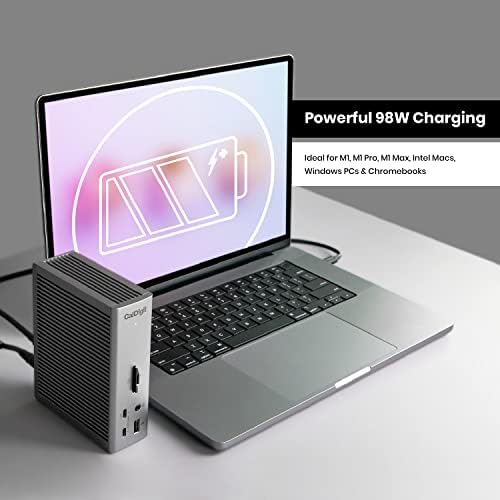
The CalDigit TS4 is the benchmark for Thunderbolt 4 docking stations and for good reason. It offers 18 ports including 2.5G ethernet, three Thunderbolt 4 downstream ports, SD card reader, and 98W host charging. It runs warm but stable, and it’s been rock-solid in daily use across hundreds of thousands of setups.
At around $350, it’s not cheap. But if you’re running a dual-monitor M2 Pro or M3 Pro MacBook Pro setup with an external SSD and audio interface, it earns every dollar. CalDigit’s build quality and driver support are genuinely better than cheaper Thunderbolt alternatives.
Best for: MacBook Pro users with complex setups, dual 4K displays, or heavy peripheral loads.
The Value Pick: UGREEN Revodok Pro 213
For most single-monitor setups, the UGREEN Revodok Pro 213 hits the sweet spot between capability and price. It’s a USB-C dock with solid build quality, reliable ethernet, and enough ports to clean up a typical home office desk without a rats’ nest of adapters.
It won’t run dual 4K displays and the transfer speeds won’t saturate a fast NVMe enclosure — but if that’s not your workflow, you’re paying for headroom you’ll never use with a TS4. The Revodok Pro 213 handles one 4K display, ethernet, USB-A peripherals, and SD cards without complaint.
Best for: MacBook Air users, single-monitor setups, and anyone who wants to cut down on cables without spending $300+.
Mid-Range Options Worth Considering
Anker 777 Thunderbolt 4 Dock (~$200): A solid middle ground if you want real Thunderbolt 4 bandwidth without the TS4 price. Fewer ports than the CalDigit but handles dual displays cleanly on MacBook Pro. Build quality is good, runs cool.
Satechi Thunderbolt 4 Slim Hub (~$150): Best for portable setups. Slim enough to travel with, supports dual 4K, but only 60W host charging — fine for MacBook Air, tight for a 16-inch Pro under load.
What to Ignore
Anything marketed as “Thunderbolt 4” for under $80 deserves scrutiny. Legitimate Thunderbolt 4 certification requires Intel’s hardware and licensing — cheap “TB4” docks are often just fast USB-C hubs with misleading packaging.
Also ignore port count as a primary buying criterion. A dock with 12 ports where half of them share bandwidth will underperform a dock with 8 ports and proper dedicated bandwidth allocation.
The Bottom Line
Buy what your actual setup requires:
- Single monitor + basic peripherals + MacBook Air: UGREEN Revodok Pro 213 — reliable, affordable, no wasted spend
- Dual 4K + MacBook Pro + complex peripherals: CalDigit TS4 — pay the premium once
- Somewhere in between: Anker 777 Thunderbolt 4 Dock — real TB4, fair price
The best dock is the one that matches your monitor count and peripheral list, not the one with the most ports or the highest spec sheet number.