Brydge Stone C USB-C Multiport Hub
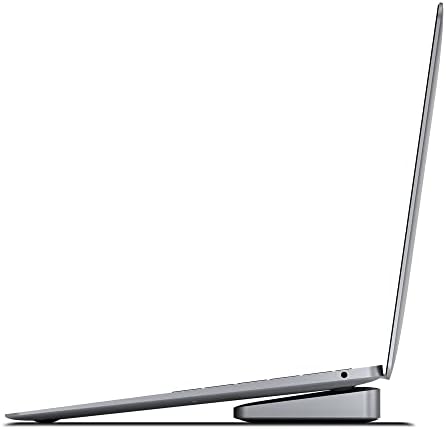
A low-profile USB-C hub designed to sit under a MacBook, adding HDMI, ethernet, SD, and extra USB ports without cluttering your desk.
Price may vary. As an affiliate, we earn from qualifying purchases.
What we like
- Sits flush under MacBook Pro/Air for a clean desk look
- 4K HDMI plus gigabit ethernet in one tidy package
- Aluminum body matches MacBook finish well
- Single USB-C connection keeps cabling simple
Could be better
- Short captive cable limits placement flexibility
- No dedicated power passthrough on this model
- Form factor only really makes sense for MacBook owners
Full Review
The Brydge Stone C is one of the few USB-C hubs that genuinely solves the MacBook docking problem instead of just adding more dongles to the pile. Instead of dangling off the side of your laptop, it slides underneath and acts as a low-profile base that elevates the chassis slightly while routing every port to the back edge of your desk.
Build and Design
The aluminum housing matches the standard MacBook space gray and silver finishes closely enough that most people won’t notice it’s a third-party accessory. It’s solid, weighty in a reassuring way, and the rubberized top pads grip the laptop without leaving marks. The footprint is small enough that it disappears under a 13-inch MacBook Air and only adds a sliver of overhang under a 14-inch Pro.
Ports and Performance
You get a 4K HDMI output, gigabit ethernet, three USB-A 3.0 ports, two USB-C ports, and an SD card reader. The HDMI is capped at 4K/30Hz, which is fine for productivity but not what you want for video editing or anything where motion smoothness matters. Ethernet performance is consistent and full gigabit, and USB-A throughput is what you’d expect from USB 3.0.
Daily Use
What makes this hub work is how invisible it becomes. Cables exit out the back, the laptop sits at a slightly more comfortable typing angle, and you reclaim the side ports of your MacBook for a charger or a single dongle when you actually need one. If you’ve ever been annoyed by a hub that flops around off the side of your laptop, this fixes that.
Who Should Buy This
Buy this if you have a MacBook Pro or Air and want a permanent desk setup that doesn’t look like a bird’s nest of cables. If you need 4K/60Hz video, dual displays, or you’re on a Windows laptop, look at the Anker 655 USB-C 8-in-1 Hub or a proper Thunderbolt dock instead.


