Cooler Master MK770 Wireless Mechanical Keyboard
A gasket-mounted, hot-swappable 96% wireless keyboard that delivers enthusiast feel at a mainstream price.
Price may vary. As an affiliate, we earn from qualifying purchases.
What we like
- Gasket-mount construction feels surprisingly premium for the price
- Tri-mode connectivity (2.4GHz, Bluetooth, USB-C) works flawlessly
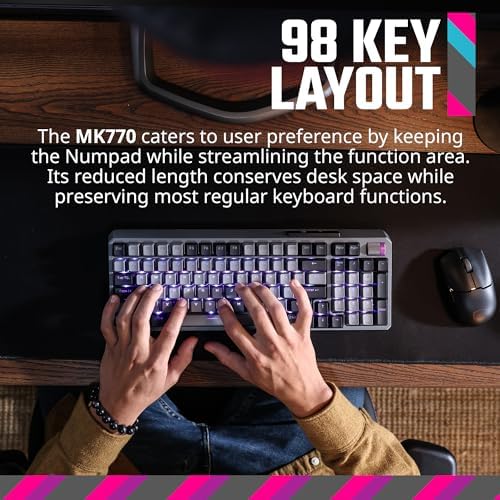
- 96% layout keeps the numpad without the TKL footprint penalty
- Hot-swappable PCB means easy switch upgrades down the line
Could be better
- Stock Kailh Box V2 switches are good, not great
- Software (MasterPlus) is clunky compared to QMK/VIA
- No per-key RGB customization through firmware — software only
Full Review
The MK770 is the keyboard I wish existed when I first started chasing the “enthusiast feel” rabbit hole. For years, the answer to “I want a gasket-mounted, hot-swappable board with good sound” has been a $200+ Keychron Q-Pro or a build-it-yourself project. The MK770 lands at $119 with most of those boxes ticked, and after several months of daily use, it holds up.
Why Gasket-Mount Actually Matters
Most pre-built mechanical keyboards bolt the plate directly to the case, which gives you that hollow, plasticky ping when you bottom out. Gasket-mount sandwiches the plate between silicone strips, letting it flex slightly with each press. The result is a softer, deeper, more controlled typing feel — closer to a custom build than to a Logitech G915.
Cooler Master also layered silicone dampening and EVA foam inside the case, so the MK770 doesn’t sound hollow. It has a muted, thocky character that’s office-appropriate even with linear switches. Not silent, but nowhere near the rattle of a typical gaming board.
The 96% Layout Is a Spreadsheet Workhorse
If you spend your day in Excel, Sheets, or any finance/data tool, a TKL is a downgrade. You lose the numpad and gain almost nothing — the function row is still there, the arrow cluster is still there. The MK770’s 96% layout keeps the numpad but eliminates the dead space, so it takes up about an inch more desk width than a TKL and saves you constantly reaching for a separate numpad.
The tactile 3-way dial in the top-right is also more useful than I expected. Volume is the default, but you can reassign it to scroll, zoom, or app switching through the software.
Wireless That Actually Works
Tri-mode means you pair it once to your work laptop over Bluetooth, plug the 2.4GHz dongle into your desktop, and switch with a key combo. No re-pairing, no dropouts. Battery life with RGB off is genuinely a couple of weeks of full-time use. With RGB cranked, expect three to four days.
The one gripe: MasterPlus, Cooler Master’s configuration software, is a downgrade from VIA or QMK. It works, but it’s bloated and slow. Most people will set it up once and never touch it again, which is fine.
Who Should Buy This
Buy the MK770 if you want your first taste of the “enthusiast” mechanical keyboard world without spending $200+ on a Keychron Q1 Pro or building a board yourself. The gasket mount and dampening are the real deal, the 96% layout is ideal for spreadsheet-heavy home office work, and the tri-mode wireless removes the cable from your desk. If you already own a Q-Pro or a Nuphy Halo, this isn’t a sidegrade worth chasing — but for everyone moving up from a generic Logitech or Razer board, it’s the new value sweet spot.


