Elgato Prompter
A compact beam-splitter teleprompter that sits in front of your camera so you can read scripts while looking directly into the lens.
Price may vary. As an affiliate, we earn from qualifying purchases.
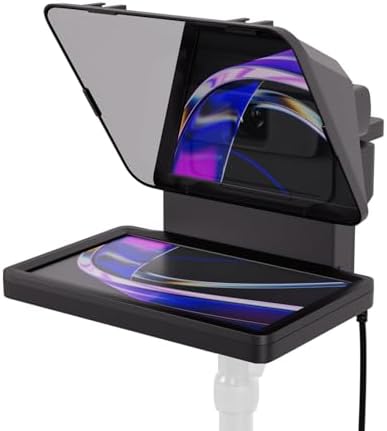
What we like
- Lets you maintain real eye contact while reading scripts
- Works as a second 9-inch display — drag any window or app onto it
- Single USB-C cable for power and video signal
- Fits most webcams, DSLRs, and mirrorless cameras
- Tight Stream Deck and Camera Hub integration
Could be better
- $300 is a lot for a 9-inch 1024x600 display
- Screen is relatively small for reading at typical camera distances
- Glass housing feels fragile and picks up fingerprints
- Lens opening limits compatibility with very large pro lenses
Full Review
The Elgato Prompter is the cleanest solution I’ve used for scripted on-camera work at a desk. It’s a 9-inch display set behind a beam-splitter glass that mounts in front of your lens — you read a mirrored script on the glass while the camera sees straight through. The result is genuine, unbroken eye contact with your audience, which is the whole point.
Setup and Build
One USB-C cable handles power and video. Plug it into your Mac or PC and the Prompter shows up as a second monitor — you can literally drag any window onto it, not just teleprompter software. The aluminum frame is solid, but the glass housing feels delicate and attracts fingerprints fast. Keep a microfiber cloth handy.
Camera compatibility is broad. It ships with a hot-shoe mount that accommodates most webcams, mirrorless bodies, and DSLRs. The lens cutout is generous but won’t clear the widest pro zooms — check your lens diameter before buying.
Reading Experience
Elgato’s Camera Hub app handles script display, chat overlays, and font sizing, and there’s dedicated Stream Deck integration for scroll speed and play/pause. Because it’s a real monitor, you can also run OBS source windows, Twitch chat, or notes on it — useful for live streams where you want glanceable info without breaking eye contact.
The 1024x600 resolution is the honest compromise. Text is crisp at normal camera distances (2-4 feet), but at 9 inches, long sentences wrap aggressively. If you script in long paragraphs, you’ll need larger margins or a slower scroll.
Is It Worth $300?
You can build a DIY teleprompter with a tablet and a $50 beam-splitter rig. The Prompter’s value is that it just works — no separate device, no app-juggling, no mirror-mode hacks. For anyone recording or streaming weekly, the time saved is real. For occasional use, the math is harder to justify.
Who Should Buy This
Buy the Elgato Prompter if you record scripted video regularly — YouTube explainers, online courses, corporate talking-head content, or live presentations where eye contact matters. It’s also a strong pick if you’re already in the Elgato ecosystem with a Stream Deck and Camera Hub workflow. If you only need a teleprompter occasionally, a tablet-based rig will save you $200 and do 80% of the job.


