Elgato Stream Deck MK.2
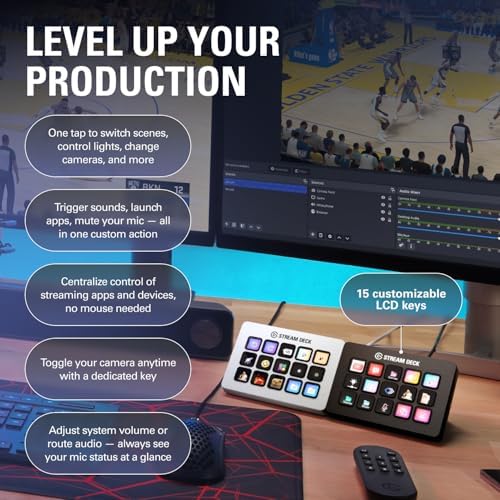
Fifteen customizable LCD keys that turn into the most satisfying productivity shortcut pad you'll ever put on your desk.
Price may vary. As an affiliate, we earn from qualifying purchases.
What we like
- Every key is a tiny LCD — icons and labels update instantly when you switch profiles
- Deep software ecosystem with plugins for Zoom, Teams, Spotify, Philips Hue, and almost any app you use
- Detachable USB-C cable and a magnetic stand that actually grips the desk
- Profile switching per app means one device handles dozens of contexts
Could be better
- Elgato's software onboarding leans heavily toward streamers, so remote workers have to hunt for relevant plugins
- $149.99 is a lot for what is, functionally, 15 buttons
- 15 keys fills up faster than you'd expect — power users often end up wanting the XL
Full Review
The Stream Deck MK.2 is marketed as a streamer’s tool, but that framing undersells it. This is a 15-key tactile shortcut pad with a full-color LCD under every key, and once you live with one on your desk, it’s hard to go back. For remote workers juggling Zoom, Slack, a half-dozen browser tabs, and three different note-taking apps, it’s genuinely productivity-altering hardware.
Build and Setup
The unit feels dense for its size — a solid slab of matte plastic with a detachable USB-C cable and a magnetic kickstand that adjusts the angle. The detachable cable is a small thing that matters: you can swap in a longer or braided cable, or route it cleanly through a grommet without the bulk of a molded strain relief. The keys themselves are satisfyingly clicky, somewhere between a mechanical keyboard switch and a high-end TV remote.
Setup is plug-and-play. The Stream Deck software installs in under a minute, and keys are configured by dragging actions from a sidebar onto the on-screen grid. Each key shows a live preview of what you’ll see on the hardware, which is a nicer workflow than it sounds.
The Productivity Angle
This is where the MK.2 earns its keep for non-streamers. Out of the box, you can bind keys to launch applications, open URLs, run multi-step macros, insert text snippets, toggle system audio, and switch virtual desktops. With plugins, it controls Zoom (mute, camera, leave meeting), toggles Philips Hue scenes, starts Pomodoro timers, sends Slack status updates, and triggers HomeKit or Home Assistant routines. One key can do several things in sequence — “start focus session” becomes mute notifications, set Hue to red, launch Things, and start a 50-minute timer.
Profiles are the other half of the magic. The software can auto-switch the entire key layout when you focus a specific app, so the same 15 keys become one thing in VS Code and something completely different in a Zoom call.
Where It Falls Short
The asking price is the obvious friction — $149.99 for 15 buttons is a hard swallow until you’ve used it. Elgato’s marketing also leans hard into streaming, so if you’re a spreadsheet-and-meetings person, you’ll spend some time filtering through OBS-centric plugins to find the productivity gems. And 15 keys is fewer than you think. Heavy users often graduate to folders (nesting keys inside keys) or upgrade to the 32-key XL.
Who Should Buy This
Buy the Stream Deck MK.2 if you run a lot of meetings, juggle multiple apps throughout the day, or already have a mental list of “I wish I had a dedicated button for that.” It shines for remote workers who want one-press Zoom mute, smart home controls, and app-launching without memorizing keyboard shortcuts. If you only ever live in one or two apps and rarely take meetings, the macro features of a good keyboard like the Logitech MX Keys S will cover most of what you need for a fraction of the price.


