Elgato Stream Deck Neo
An 8-key Stream Deck with two always-on info touch points — the most affordable LCD-key macro pad and a genuinely useful productivity tool for remote workers.
Price may vary. As an affiliate, we earn from qualifying purchases.
What we like
- $50 cheaper than the MK.2 with the same core software
- Two info touch points show clock, weather, or notifications without taking up a key
- Sleek flush design looks at home on a desk, not just a streaming rig
- Plenty of keys for Zoom controls, app launching, and focus timers
Could be better
- 8 keys fills up faster than you'd think once you start nesting profiles
- Touch points are limited — they're info displays, not full touchscreens
- Stand is fixed angle with no adjustment
Full Review
The Stream Deck Neo is Elgato’s pitch to people who aren’t streamers. At $99.99, it undercuts the Stream Deck MK.2 by fifty bucks while using the same software ecosystem. The trade-off is fewer keys — 8 instead of 15 — plus two new “touch points” that double as an always-on info display.
For home office use, this is the right shape of compromise.
8 Keys Is Enough (Mostly)
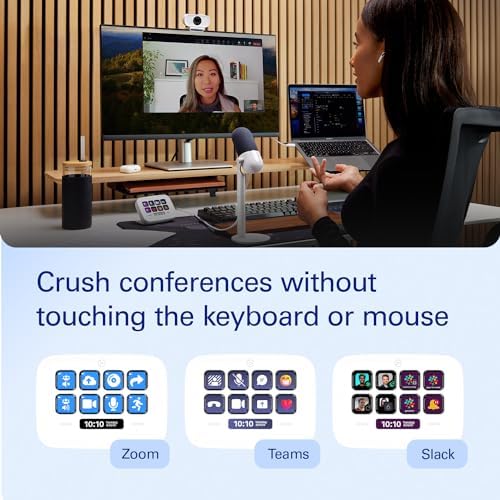
Eight customizable LCD keys sounds tight, and it is — until you remember Stream Deck profiles let you nest folders. One key can open a folder of eight more. In practice, my top layer became: Zoom mute, Zoom camera, Slack DND, focus timer start, app launcher folder, browser tabs folder, scratchpad, and a “back to home” key.
That covers 90% of daily use. If you’re running a streaming rig with scenes, transitions, and audio sources, you’ll outgrow Neo fast and want the MK.2 or the Stream Deck +. If you’re a remote worker toggling meeting controls and launching apps, eight is plenty.
The Touch Points Are the Sleeper Feature
The two strips above and below the keys aren’t just decoration. They show clock, date, weather, profile name, and notification badges — and they update live without burning a key slot. Having an always-visible clock and weather strip on the desk is genuinely nice, especially if your monitor is full of windows that hide the menu bar.
You can also tap them to switch profiles, which is faster than diving into nested folders.
Productivity Use Cases That Actually Stick
The macros that earn their keep for me on Neo:
- One-tap Zoom mute and camera toggle (no more fumbling for the meeting window)
- Focus timer start/stop tied to a Pomodoro app
- App launcher that opens my “deep work” stack — editor, terminal, notes
- A “shut it down” key that closes Slack and Teams at end of day
It’s a small thing, but eliminating the 3-second hunt for keyboard shortcuts adds up. For a deeper look at how to set these up, see our productivity Stream Deck guide.
Build and Software
Build quality is on par with the MK.2 — solid plastic, no flex, USB-C cable hardwired in. The fixed stand angle is the one complaint; the MK.2 lets you swap faceplates and adjust, Neo doesn’t. Software is identical: same plugin marketplace, same drag-and-drop setup, same Mac and PC support.
Who Should Buy This
Buy the Stream Deck Neo if you’re a remote worker who wants meeting controls, app launching, and focus tools at your fingertips without spending $150. The 8-key layout is the sweet spot for office productivity, and the info touch points add real value over the MK.2’s blank bezels.
Skip it if you stream, edit video, or run complex OBS scenes — get the MK.2 (15 keys) or Stream Deck + (keys plus dials) instead. Skip it if you only need 2-3 shortcuts; a $25 macro pad will do. But for the home office productivity slot, Neo is the right starting point.


