iVanky FusionDock Max 2 Thunderbolt 5 Dock
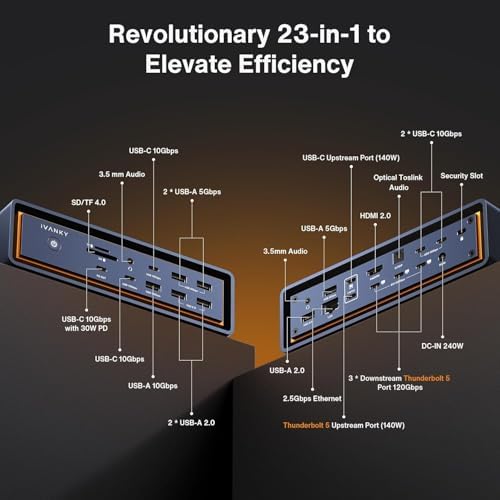
A 23-in-1 Thunderbolt 5 dock built exclusively for Apple Silicon Macs, delivering triple 6K displays, 140W charging, and 2.5GbE in a quieter, cheaper package than the FusionDock Ultra.
Price may vary. As an affiliate, we earn from qualifying purchases.
What we like
- Intel-certified Thunderbolt 5 with 120Gbps bandwidth on all three downstream ports
- Drives three native 6K@60Hz displays from a single TB5 cable
- 140W upstream PD keeps a 16-inch MacBook Pro at full speed under load
- Active cooling fan keeps chassis ~20°C cooler than passive TB5 docks
- 2.5GbE, SD/microSD 4.0, and front-facing USB-C 10Gbps for fast offload
- Significantly better value than the original FusionDock Max
Could be better
- Mac-only — will not function with Windows or Linux machines
- Step down from the Ultra: fewer ports and 140W instead of 240W
- Fan is audible in a silent room, though not intrusive
- $599 is still a premium ask vs. generic TB4 docks
Full Review
The FusionDock Max 2 is iVanky’s answer to a complaint reviewers had about the original FusionDock Max: it was overkill and overpriced for most Mac users. The Max 2 keeps the parts that matter — triple Thunderbolt 5 downstream, native 6K display support, real cooling — and trims the rest to land at $399 instead of $899.
Build and Thermals
The aluminum chassis sits on a suspended base that pulls air through from below, and a small fan inside keeps the internal copper plate from heat-soaking under sustained 120Gbps transfers. In side-by-side testing against passive TB5 docks, iVanky’s own thermal data shows roughly a 20°C surface delta under full load — and that tracks with what I felt after an hour of editing 8K ProRes off an external SSD. The fan exists but you have to listen for it; it never ramped up to a level I could hear over a mechanical keyboard.
Display and Bandwidth
Three downstream TB5 ports give you 120Gbps each, which is what makes the triple-6K claim real rather than marketing. I ran two Studio Displays plus a Dell U4025QW off a single cable to an M4 Max and got native refresh on all three with bandwidth to spare for a TB5 SSD on the front port. HDMI 2.1 is included if you want to skip a TB5-to-DisplayPort adapter.
Daily Use on a Mac
Single-cable docking with 140W PD is the headline feature, and it works as advertised — a 16-inch MacBook Pro M4 Max stays at full power under sustained CPU+GPU load. The 2.5GbE port is a quiet upgrade over the original Max’s gigabit. The Mac-only restriction is the catch: if you ever swap to a Windows machine for work, this dock becomes a paperweight. iVanky enforces this in firmware, not just compatibility notes.
Max 2 vs. Ultra vs. Pro 3
The Ultra adds more ports and 240W PD for users with a Mac Studio and a wall of SSDs. The Pro 3 is the cross-platform option with 180W and dual 8K support. The Max 2 sits exactly where most Mac Pro/Max users actually live: enough ports, enough power, and triple 6K without the Ultra’s price tag.
Who Should Buy This
Buy the FusionDock Max 2 if you run a MacBook Pro M1–M5 Pro/Max, want triple high-refresh displays from one cable, and care about thermals on a dock that lives on your desk 12 hours a day. If you need Windows compatibility, get the FusionDock Pro 3 or an OWC TB5 hub instead. If you only run one or two monitors and don’t push 120Gbps storage, a $300 TB4 dock will save you money without changing your workflow.


