Kensington SlimBlade Pro Wireless Trackball
A premium ambidextrous trackball with a 55mm precision ball and twist-to-scroll — built for designers, architects, and CAD users who need fine cursor control.
Price may vary. As an affiliate, we earn from qualifying purchases.
What we like
- Large 55mm ball gives unmatched precision for design and CAD work
- Twist-the-ball scroll feels natural once you adapt to it
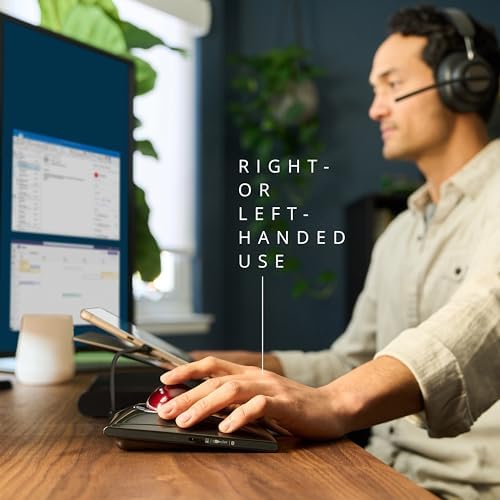
- Ambidextrous shape works equally well with either hand
- Bluetooth, 2.4GHz, and USB-C wired — connects to almost anything
- Rechargeable battery lasts months between charges
Could be better
- Steep learning curve coming from a mouse or finger trackball
- Flat profile gives no wrist support — a separate rest is recommended
- Only four buttons — power users will want more
Full Review
The SlimBlade Pro is the trackball Kensington fans have been waiting on for years — a modernized take on the cult-favorite SlimBlade with rechargeable battery, Bluetooth, and a refined sensor. It is also the most polarizing trackball on the market. You either love the whole-hand control or you bounce off it within a week.
The 55mm Ball Changes How You Work
The defining feature is the ball itself. At 55mm, it is dramatically larger than the marble-sized orb on a Logitech MX Ergo S, and you control it with your fingertips and palm rather than a single thumb. That sounds awkward, and for the first few days it is. Once it clicks, you get a level of precision that finger and thumb trackballs simply cannot match — small, deliberate movements for pixel-level work, and long lazy swipes for quick travel across a 4K or ultrawide display.
This is why architects, CAD users, and illustrators gravitate to it. Selecting vertices in Rhino or pulling Bezier handles in Illustrator feels closer to drawing than mousing.
Scroll by Twisting the Ball
Instead of a wheel, you scroll by rotating the ball clockwise or counterclockwise in place. It is the feature most people doubt and then refuse to give up. Sensors in all four corners detect the twist, so horizontal scrolling and zooming work the same way — useful for timelines, spreadsheets, and large canvases. Expect a week of muscle memory pain before it feels automatic.
SlimBlade Pro vs MX Ergo S
These are the two trackballs most people cross-shop, and they solve different problems. The Logitech MX Ergo S is a thumb-driven trackball shaped like an ergonomic mouse — easy transition from a regular mouse, comfortable for long days, but limited in fine precision because your thumb is doing all the work.
The SlimBlade Pro is whole-hand control. It is harder to learn, less forgiving for casual browsing, and far more precise for creative work. If you are a designer or engineer who lives in CAD, 3D, or vector tools, the SlimBlade wins. If you want a comfortable everyday pointer for office work, the Ergo S is the easier recommendation.
Connectivity and Build
Three connection modes — Bluetooth, 2.4GHz USB-A dongle, and USB-C wired — cover every desk setup, including locked-down work machines that block Bluetooth peripherals. Battery life is rated around four months per charge, and the USB-C port means you can keep working while it tops up. The shell is matte plastic with a satisfying weight; it stays planted on the desk without rubber feet creep.
The flat, low-profile shape is the trade-off. There is no built-in palm support, so if you work long hours, plan on adding a wrist rest behind it. Kensington sells a matching one, but any padded rest works.
Who Should Buy This
Buy the SlimBlade Pro if you do precision work — CAD, 3D modeling, illustration, photo retouching, video timeline editing — and you are willing to invest a week in learning a new input method. It is also the right pick if you switch hands during the day to manage RSI, since the ambidextrous shape genuinely works for both.
Skip it if you mostly do email, browsing, and meetings. The learning curve is not worth it for general office use, and a thumb trackball like the MX Ergo S will make you happier on day one. At $99, it is priced as a tool for people who will use it eight hours a day — that is who it rewards.


