Keychron K3 Pro Low Profile Wireless Keyboard
A 19mm-thin 75% mechanical keyboard with low-profile switches, wireless connectivity, and full QMK/VIA support — the answer for anyone who wants a mechanical board that looks like a laptop.
Price may vary. As an affiliate, we earn from qualifying purchases.
What we like
- Ultra-slim 19mm profile feels like a chiclet keyboard but types like a mechanical
- Dual wireless (Bluetooth 5.1 + wired) with pairing for three devices
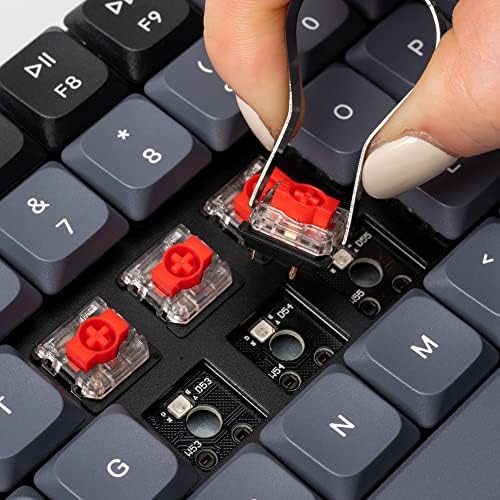
- Hot-swappable low-profile switches let you change feel without soldering
- QMK/VIA support for deep remapping and macros
- Mac and Windows keycaps in the box
Could be better
- 75% layout drops the numpad and cramps the arrow cluster
- RGB battery life drops fast with backlight on
- Low-profile switches feel shallower than standard mechanical — not for everyone
Full Review
The K3 Pro solves a specific problem: you want the tactile satisfaction of a mechanical keyboard without the two-inch-tall brick of plastic sitting on your desk. At 19mm thin with low-profile Gateron switches, it looks almost indistinguishable from a premium laptop keyboard — until you start typing.
Build and Feel
The aluminum frame is rigid with zero deck flex, and the double-shot PBT keycaps resist the shine that plagues cheaper ABS caps. The low-profile switches have about 3mm of travel versus 4mm on standard mechanical switches, which lands somewhere between a MacBook keyboard and a traditional mech. Typists coming from Apple’s scissor switches adapt in an afternoon. Typists coming from a full-travel board need a week and may never love it quite as much.
Wireless and Software
Bluetooth 5.1 pairs with three devices via hotkey toggle, and switching between my MacBook and iPad is instant. Wired mode via USB-C is there when you want zero latency or a dead battery bailout. The real draw is QMK/VIA — open the VIA web app, plug in, and every key is remappable with layers, macros, and tap-hold behaviors. Most wireless mechanical boards lock you into manufacturer software; this one doesn’t.
The 75% Tradeoff
The 75% layout keeps function keys and arrows but ditches the numpad and the six-key nav cluster. If you live in spreadsheets, this board will slow you down. If you’re a coder or writer who never touches a numpad, you’ll appreciate reclaiming desk space for a mouse. The arrow keys sit flush against Shift and ?, which takes adjustment.
Backlight Reality Check
Keychron advertises 100 hours battery life — that’s with backlight off. Turn on RGB at full brightness and you’ll be charging every few days. The white-backlit variant is cheaper and lasts noticeably longer if you don’t need color.
Who Should Buy This
Buy the K3 Pro if you want mechanical-keyboard feel in a MacBook-aesthetic package, and if QMK/VIA programmability matters to you. Skip it if you need a numpad, if you’re sensitive to short key travel, or if you want the deep thocky sound of a full-height custom board. If the 75% layout scares you but you love the low profile, the K5 Pro gives you the same slim build with a full-size layout instead.


