Keychron V3 TKL Knob Hot-Swappable Wired Keyboard
Keychron's V3 brings gasket-mounted feel, QMK/VIA, and a programmable knob to a TKL wired board for under $100.
Price may vary. As an affiliate, we earn from qualifying purchases.
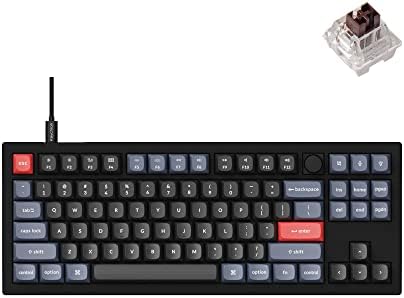
What we like
- Double-gasket mount delivers a soft, muted typing feel that punches well above the price
- Full QMK/VIA support — remap every key and layer in a browser
- Hot-swappable PCB accepts 3-pin and 5-pin MX switches
- Programmable rotary knob handles volume, zoom, or whatever you map it to
- South-facing RGB clears Cherry-profile keycaps without shine-through issues
Could be better
- ABS plastic case — not the CNC aluminum frame you get on the Q series
- Wired only; no Bluetooth or 2.4 GHz option at this tier
- TKL footprint takes more desk space than a 75% layout
Full Review
The Keychron V3 is what happens when Keychron takes the custom-keyboard formula from the $200 Q series and strips it down to hit $89. You lose the CNC aluminum case. You keep almost everything else that actually matters for typing feel.
Build and Typing Feel
The V3 uses a double-gasket mount — the plate sits between silicone strips on both the top and bottom of the case — and the result is a noticeably softer, less pingy typing experience than you’d expect from a plastic board. Keychron layers in sound-dampening foam, IXPE switch foam, and a PET sheet between the plate and PCB. Tapping the spacebar produces a muted thock rather than the hollow clack most budget boards deliver.
It’s not aluminum, and you can tell if you lift it — the V3 weighs about 2.2 pounds where a Q3 weighs nearly 5. But sitting on a desk, the rubber feet keep it planted, and the typing acoustics are legitimately close.
QMK, VIA, and the Knob
This is where the V series earns its keep. QMK firmware with full VIA support means you open a browser, drag keys around, build layers, program macros, and flash instantly — no software install, no cloud account. The rotary knob is fully programmable. Default is volume, but mapping it to horizontal scroll in a spreadsheet or zoom in Figma is where it starts to feel essential.
Switches and Keycaps
Hot-swap sockets accept any 3-pin or 5-pin MX-style switch, so the stock K Pro switches are a starting point, not a commitment. The double-shot PBT keycaps in OSA profile (a rounded, cylindrical shape closer to Cherry than OEM) hold up to daily typing without the greasy shine ABS develops in a few months.
Who Should Buy This
Buy the V3 if you want the custom-keyboard typing experience — gasket mount, QMK/VIA, hot-swap, programmable knob — without paying Q-series prices, and you’re fine staying wired. If you need wireless, step up to the Keychron Q1 Pro or the V3 Max. If you want the aluminum case specifically, the Q3 is the upgrade. For anyone working at a desk where the keyboard never moves, the V3 gets you 90% of the custom experience at under half the cost.


