Kinesis Advantage360 Pro Split Keyboard
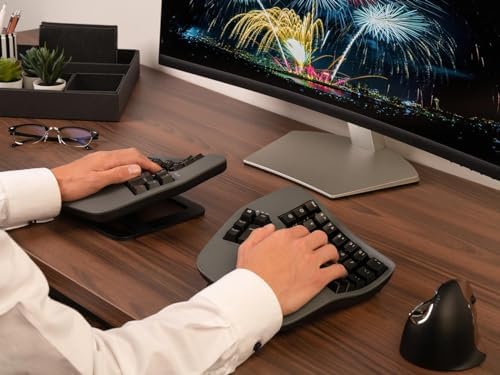
The medical-grade contoured ergo keyboard with deep key wells, wireless ZMK firmware, and a layout that cuts finger travel almost in half.
Price may vary. As an affiliate, we earn from qualifying purchases.
What we like
- Concave key wells dramatically reduce finger reach and strain
- Wireless Bluetooth with open-source ZMK firmware
- True split halves separate up to 10 inches with included cable
- Quiet Kailh Box Pink switches and PBT keycaps feel premium
- Adjustable tenting and thumb clusters offload work from pinkies
Could be better
- $499 price tag is steep even by ergo keyboard standards
- Two- to four-week learning curve before typing speed recovers
- Bulky footprint and unique shape make it hard to travel with
Full Review
The Advantage360 Pro is what you graduate to after years of fighting wrist pain on flat boards. Kinesis has been making contoured keyboards for over thirty years, and this is the wireless flagship — the one physical therapists and developers with RSI keep recommending when nothing else works.
The Bowl Layout Actually Works
The defining feature is the concave “bowl” — keys are arranged in deep wells that match the natural arc of your fingers. Kinesis claims it reduces finger travel by roughly half compared to a flat keyboard, and after a few weeks the difference is real. Your fingers stop reaching and start curling, which is what they want to do anyway.
The thumb clusters are the other big idea. Enter, Backspace, Space, and modifiers all sit under your thumbs instead of your pinkies, which is the single biggest source of repetitive strain on a normal layout. Once you internalize it, going back to a regular keyboard feels barbaric.
Wireless ZMK Firmware Is a Game Changer
The Pro upgrade over the original Advantage360 is open-source ZMK firmware and proper Bluetooth. You can flash custom layouts, build complex combos and layers, and pair to multiple devices without dongles. For anyone who lives in their text editor, this is closer to a programmable instrument than a keyboard.
Battery life runs roughly two to three weeks of heavy daily use between charges. The two halves connect to each other wirelessly as well, so the only cables you’ll see are the optional USB-C charging leads.
The Learning Curve Is Real
Be honest with yourself: you will type 20 words per minute for the first week. By week three you’ll be back to 80% of your old speed, and by week six most people meet or beat their previous WPM. If you can’t afford a productivity hit during the transition, plan around a slow week.
If you want a more portable contoured option, the MoErgo Glove80 is lighter and lower profile. The ZSA Moonlander is flat-split rather than bowl-shaped — easier to learn, but doesn’t reduce finger travel the way the Advantage360 does.
Who Should Buy This
Buy the Advantage360 Pro if you have wrist or finger pain that won’t quit, or you type for a living and want the most ergonomic keyboard money can buy. The wireless version is worth the premium over the wired Advantage360 if you value a clean desk or move between machines. Skip it if you’re just curious about split keyboards — start with a Moonlander or Keychron Q11 first and graduate to this if you decide bowl layouts are your future.


