Kinesis Advantage360 Professional Split Ergonomic Keyboard
The endgame split ergonomic keyboard with contoured keywells, adjustable tenting, Bluetooth, and open-source ZMK firmware.
Price may vary. As an affiliate, we earn from qualifying purchases.
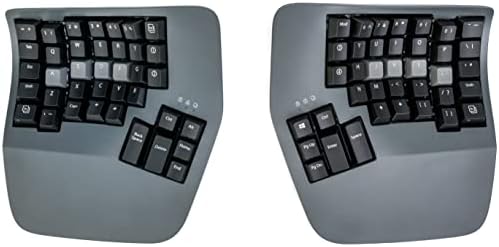
What we like
- Concave contoured keywells dramatically reduce finger travel and strain
- Best-in-class thumb cluster — six dedicated keys per hand for real workload offloading
- Adjustable integrated tenting (0°, 10°, 20°) with no extra hardware
- Fully programmable via open-source ZMK firmware — unlimited layers and macros
- Bluetooth plus USB-C with solid battery life and per-key RGB backlighting
Could be better
- Steep learning curve — expect 2-4 weeks before you regain full typing speed
- ZMK configuration is powerful but unfriendly compared to MoErgo's web GUI
- Large desk footprint even when split, and the cable between halves is short
Full Review
The Advantage360 Professional is what you buy when your wrists have started filing complaints and a tented split board with normal flat keys isn’t cutting it anymore. The contoured keywells, dedicated thumb clusters, and adjustable tenting put it in a tiny club with the MoErgo Glove80 — and at $499, picking between the two is the real question.
The Keywell Is the Whole Point
Most “ergonomic” keyboards are flat split boards. The Advantage360 isn’t. Each half scoops your fingers into a concave bowl, so your pinkies and index fingers travel roughly the same distance to reach any row. After the adjustment period, the difference is real: less finger extension, less wrist deviation, less of that end-of-day ache. Tenting is built in with three angles, and the halves separate up to about 10 inches, so you can square your shoulders for the first time in years.
Thumb Cluster That Actually Earns Its Keep
This is where the Advantage360 pulls ahead of the Glove80. Each thumb gets six keys at slightly different heights and angles — Enter, Space, Backspace, Delete, Ctrl, Alt — letting you move the heaviest-hit keys off your overworked pinkies. The Glove80’s cluster is larger and arguably more comfortable to rest on, but Kinesis’s layout is faster to learn and more useful day-to-day for typical desktop work.
ZMK Firmware, Bluetooth, and Backlight
The Pro upgrades the standard Advantage360 with wireless (Bluetooth 5.0), per-key RGB backlighting, and open-source ZMK firmware in place of the locked SmartSet system. ZMK unlocks unlimited layers, complex macros, combos, and home-row mods — but you’ll be editing config files in a GitHub repo, not clicking through a polished web app. If that sounds painful, the Glove80’s Layout Editor is genuinely more pleasant. If it sounds like freedom, you’ll love this.
Glove80 vs Advantage360 Pro
Buy the Glove80 if you want a softer landing — better default config, friendlier setup, lower-profile feel. Buy the Advantage360 Pro if you want the superior thumb cluster, deeper keywells, and don’t mind learning ZMK to wring the most out of it. Both are excellent; neither is a mistake.
Who Should Buy This
Get the Advantage360 Professional if you’re a heavy typist with existing wrist or RSI issues, you’ve outgrown flat split boards, and you’re willing to spend two to four weeks rebuilding muscle memory in exchange for years of comfortable typing. If you want plug-and-play comfort with minimal tinkering, the MoErgo Glove80 is the friendlier option at a similar price.


