Kinesis Freestyle Edge RGB Split Mechanical Keyboard
A fully split mechanical keyboard built for typists with wrist pain or RSI — adjustable separation, Cherry MX switches, and an optional tenting kit make it the serious ergonomic pick.
Price may vary. As an affiliate, we earn from qualifying purchases.
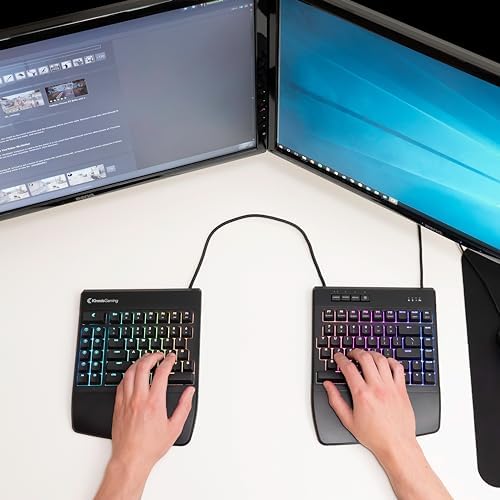
What we like
- True split design with up to 20 inches of separation between halves
- Cherry MX mechanical switches with multiple options (Red, Brown, Blue, Silver)
- Detachable cushioned palm supports included
- Fully programmable with onboard profiles and macros — no software required
- Per-key RGB with 10 effects
Could be better
- Optional tenting/lift kit costs extra (~$25)
- TKL layout — no dedicated number pad
- Bulky footprint when splayed wide
- No wireless option
Full Review
The Kinesis Freestyle Edge RGB is the keyboard you buy when your wrists hurt and you’ve decided to do something about it. It’s not subtle, it’s not pretty, and it’s not cheap — but for serious RSI prevention or recovery, nothing else in this price bracket comes close.
The Split That Actually Helps
The two halves connect with a 20-inch cable, which means you can position each side directly in front of your shoulders. That’s the whole point. When your hands sit shoulder-width apart instead of squeezed together at center, your wrists stop ulnar-deviating and your shoulders stop hunching inward.
Most “ergonomic” keyboards fake this with a fixed wedge shape. The Edge actually separates, which is a meaningfully different posture. Once you’ve typed on a real split for a few weeks, going back to a unibody keyboard feels physically wrong.
Build, Switches, and Feel
It’s a Cherry MX board, so the typing feel is exactly what you’d expect — solid, consistent, and built to outlast the rest of your desk. The Red switches are the most popular choice for office work: linear, quiet enough, low actuation force. If you want tactile feedback, Brown is the safer pick. Blue is great if you don’t share an office.
The included palm rests are genuinely cushioned, not the sad foam strips you get on cheaper keyboards. The case itself is plastic but doesn’t flex, and the legends on the keycaps haven’t shown wear after months of heavy typing.
Tenting Is Sold Separately (And You’ll Want It)
The honest knock against this keyboard: the tenting kit, which lifts the inside edges so your palms face slightly inward, is a separate ~$25 purchase. That should be in the box at this price. If you’re buying the Edge for ergonomic reasons, budget for the lift kit on day one — flat splits help, but tented splits help more.
RGB and Programmability
The per-key RGB is fine. It’s bright, it has the usual effects, and you’ll probably set it to a single color and forget about it. The more useful feature is the onboard programming — nine profiles, dual layers, full macro support, all configurable without installing software. Linux users especially will appreciate that nothing depends on a Windows-only driver.
Who Should Buy This
Buy the Freestyle Edge RGB if you have wrist pain, RSI, or shoulder tension from typing, and you’re ready to invest in a real fix instead of another wrist rest. It’s also the right pick for anyone who’s already convinced on split keyboards and wants Cherry MX switches without jumping to a $300+ enthusiast board like the ZSA Moonlander or Glove80.
Skip it if you need a number pad, want wireless, or you’re just shopping for “a nice mechanical keyboard.” For that, the Keychron Q-series or a Logitech MX Mechanical will serve you better. The Edge is a tool for a specific problem — and if you have that problem, it’s worth every dollar.


