Lemokey L3 TKL Wireless Mechanical Keyboard
A full-metal, gasket-mounted TKL with hot-swap switches, tri-mode wireless, and a programmable knob plus macro keys — premium build at half the price of a true custom board.
Price may vary. As an affiliate, we earn from qualifying purchases.
What we like
- Heavy CNC aluminum case feels like a $400 custom board
- Double-gasket mount delivers a soft, deep typing feel out of the box
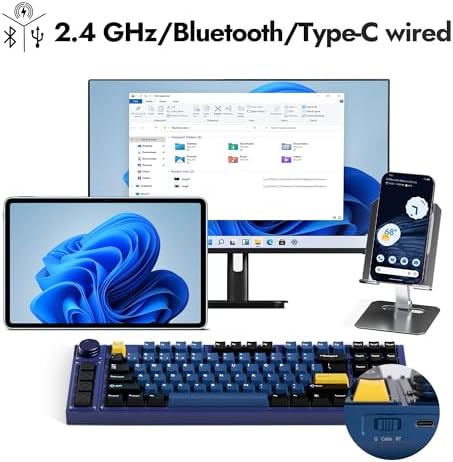
- Tri-mode connectivity (2.4GHz, Bluetooth 5.1, USB-C) with three BT device slots
- Hot-swap south-facing PCB accepts almost any 3- or 5-pin MX switch
- QMK/VIA via Keychron Launcher — remap keys and macros in a browser, no install
- Programmable volume knob plus a column of left-side macro keys
Could be better
- Weighs ~5 lb — this is a desk keyboard, not a portable
- Stock Gateron switches are fine but enthusiasts will still want to swap them
- No per-key RGB shine-through on the PBT keycaps
Full Review
The Lemokey L3 is Keychron’s attempt to bottle the feel of a $400+ custom build and sell it for $249. After a few weeks of daily driving it for writing, coding, and a steady diet of email, it mostly succeeds — with a few caveats worth knowing about before you commit.
Build and Typing Feel
Lift the L3 out of the box and the first thing you notice is the weight. The full CNC aluminum case is about five pounds, with the kind of dead, no-flex solidity you only get from a heavy metal tray. The double-gasket mount softens the bottom-out into something deep and slightly bouncy, and the stock screw-in stabilizers are tuned well enough that the spacebar doesn’t rattle. The Gateron Jupiter switches that ship in it are pleasant — smooth linears or crisp tactiles depending on which SKU you pick — but the hot-swap PCB means swapping them is a five-minute job whenever you decide you want something fancier.
The Knob and Macro Column
Lemokey added a programmable rotary encoder in the top-right corner and a column of four extra keys down the left side. By default the knob handles volume, but through QMK/VIA in the Keychron Launcher you can bind it to scrubbing video timelines, zooming in Figma, or stepping through diff hunks. The four left-side keys are the real productivity story for a home office — bind them to Slack mute, screenshot region, paste-as-plain-text, and a one-shot focus-mode macro and they earn their keep within a day.
Lemokey L3 vs Keychron Q3 Max
This is the comparison most buyers actually care about. The Q3 Max is $200 with the same QMK firmware, similar gasket mount, and Keychron’s tri-mode wireless. The L3 charges you $50 more for a denser aluminum frame, the left-side macro keys, and slightly nicer stock components. If you don’t need the macro column, the Q3 Max is the smarter buy. If you’re a creative pro, developer, or anyone who lives in keyboard shortcuts, the L3’s extra keys plus knob justify the upgrade.
Software and Connectivity
Keychron Launcher runs in your browser via WebHID — no install, no account, works on macOS, Windows, and Linux. Switching between the three Bluetooth slots, 2.4GHz dongle, and USB-C is a Fn-key combo and takes about a second. Battery life with RGB off is roughly two weeks of heavy use.
Who Should Buy This
Get the Lemokey L3 if you’re a home office power user who wants the heft and acoustics of a custom board without the time sink of sourcing a kit, lubing switches, and flashing firmware yourself. The left-side macro column makes it especially good for creatives who live in shortcut-heavy apps like Figma, Premiere, or DaVinci Resolve. Skip it if you need something portable, if you don’t use macros, or if the $200 Keychron Q3 Max already covers everything you need.


