Lofree Flow84 Low Profile Mechanical Keyboard
The low-profile mech that quietly took the typing-feel crown in 2025 — a 75% gasket-mounted board with POM switches that's smoother than anything from NuPhy or Keychron.
Price may vary. As an affiliate, we earn from qualifying purchases.
What we like
- Best low-profile typing feel on the market — POM switches feel buttery, not crunchy
- Proper gasket mount gives it real flex and a cushioned bottom-out
- Wedge profile and rounded corners look genuinely Mac-native
- Hot-swap sockets work with low-profile switches if you want to tinker
- Bluetooth, 2.4GHz dongle, and USB-C wired — covers everything
Could be better
- RGB is sidelit only, so it doesn't punch through PBT keycaps in the dark
- Battery life is just okay if you leave RGB on
- Knob and macro keys you'd expect at this price aren't here
Full Review
The Lofree Flow84 is the keyboard that finally made low-profile mechanicals feel like real mechanicals. For years the trade-off was clear — if you wanted a slim board that fit next to a MacBook, you accepted a slightly hollow, slightly scratchy typing feel. The Flow84 broke that pattern, and a year later nothing in its category has caught up.
Why the Typing Feel Is Different
The trick is the switch. Lofree worked with Kailh on a full-POM low-profile switch — both the stem and the housing are self-lubricating plastic, so there’s no scratch even on a brand-new board. Pair that with a real gasket mount (not the foam-sandwich nonsense some boards call gasket-mounted) and the result is a soft, marshmallow-y bottom-out that’s closer to a full-size custom build than to anything else this thin.
The Ghost Linear switch is the safer pick — light, smooth, no surprises. The Phantom Tactile has a rounded bump that’s gentler than a Boba U4T but more defined than a Holy Panda clone. Either feels noticeably better than the Gateron switches in a NuPhy Air75 V2 or the optical switches in a Keychron K3 Pro.
Mac-Friendly Without Trying Too Hard
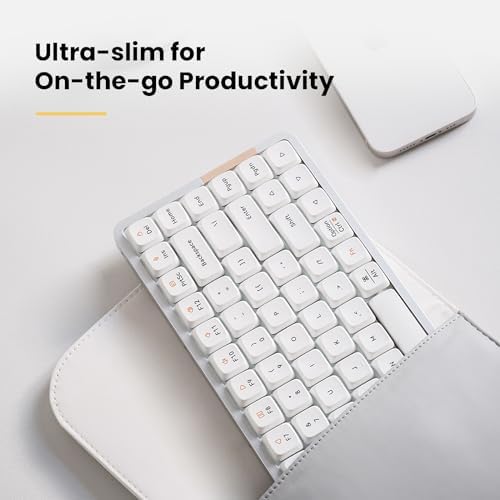
Visually, this is the closest a third-party keyboard gets to looking like Apple made it. The wedge profile slopes the same way a Magic Keyboard does, the corners are rounded, and the off-white colorway with grey legends is restrained in a way most gaming-adjacent brands can’t manage. It sits next to a Mac mini or a Studio Display without looking out of place.
Mac and Windows layouts are both printed on the keycaps, and a hardware switch on the back flips between them. Bluetooth pairs to three devices, the 2.4GHz dongle handles latency-sensitive work, and USB-C wired mode charges while you type.
Where It Falls Short
The RGB is sidelit only — the LEDs sit beside each switch rather than under it, so the legends on the PBT caps don’t light up. If you type in the dark, this matters. The K3 Pro’s south-facing backlight is more useful.
Battery life lands around 40 hours with RGB on, 100+ with it off. That’s fine but not class-leading. And at $169, you don’t get a volume knob, dedicated macro keys, or the kind of customization software a Keychron Q-series board ships with — you’re paying for the typing feel, not the feature list.
Who Should Buy This
Get the Flow84 if typing experience is the thing you care about most and you want a low-profile board that doesn’t compromise on it. It’s the right keyboard for Mac users who want something that looks at home next to their hardware, and for anyone who’s tried a NuPhy Air or Keychron K3 and walked away wanting more. If you need a numpad, dedicated media keys, or per-key RGB, look at the Keychron K3 Pro or wait for the Flow100 instead.


