Logitech Brio 500 1080p Webcam
A polished mid-range 1080p webcam with RightLight 4, Show Mode, and USB-C — the best pick between the aging C920 and the pricey 4K MX Brio.
Price may vary. As an affiliate, we earn from qualifying purchases.
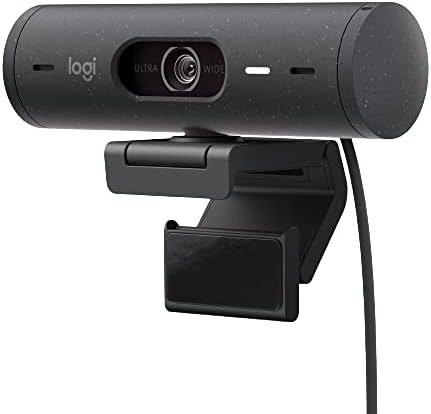
What we like
- RightLight 4 handles mixed lighting noticeably better than the C920
- USB-C connection with a braided, detachable cable
- Show Mode tilts the view down for desk demos and document sharing
- Auto-framing and dual noise-reduction mics work out of the box
Could be better
- Capped at 1080p/30fps — no 60fps or 4K option
- Logi Tune software is required for several key features
- Magnetic mount is clever but less stable than a traditional clip on thin monitors
Full Review
The Brio 500 is Logitech’s answer to a simple question: what do you buy when the C920 feels dated but the MX Brio 4K is overkill? It lands in the sweet spot — modern image processing, USB-C, and a few genuinely useful features, without the premium price.
Image Quality in Real Lighting
This is where the Brio 500 earns its keep. RightLight 4 does a measurably better job than the C920 in the lighting most remote workers actually have — a bright window behind you, a dim corner office, a mix of warm desk lamp and cool overhead LEDs. Skin tones stay natural, highlights don’t blow out, and shadows keep detail.
It’s still a 1080p/30fps sensor, so don’t expect the crispness of the 4K MX Brio or the low-light performance of the Insta360 Link. But side-by-side with the C920 in anything other than perfect studio lighting, the 500 looks like a newer camera — because it is.
Show Mode and Auto-Framing
Show Mode is the feature people actually use. Flip the camera down with a magnet and it auto-rotates and flips the image so you can demo a notebook, a product, or a whiteboard without unmounting the whole thing. It’s niche but delightful when you need it.
Auto-framing keeps you centered if you lean or shift, and unlike some competitors, it’s subtle — no jarring zoom snaps. You can disable it in Logi Tune if you prefer a locked frame.
Build and Mounting
The magnetic monitor mount is the big design change from the C920. It grips well on most monitors, and the camera snaps on and off cleanly. On very thin OLED panels, the weight can tilt it slightly, so heavier monitors are a better match. A tripod thread on the bottom gives you the flexibility the C920 never had.
The braided USB-C cable is detachable — a small thing that matters for cable management.
Who Should Buy This
Get the Brio 500 if you want a clear upgrade from the C920 without jumping to 4K. It’s the best mid-range 1080p webcam for mixed lighting, and Show Mode is a real productivity feature if you demo things on camera.
If you stream or record content, skip this and get the MX Brio 4K or an Elgato Facecam. If you’re on a tight budget and your lighting is controlled, the C920s is still fine and half the price.


