Logitech K780 Multi-Device Wireless Keyboard
A full-size wireless keyboard with a built-in device cradle that switches between three computers, phones, or tablets — the best option for anyone juggling multiple devices at their desk.
Price may vary. As an affiliate, we earn from qualifying purchases.
What we like
- Switches instantly between 3 devices with a dedicated Easy-Switch button
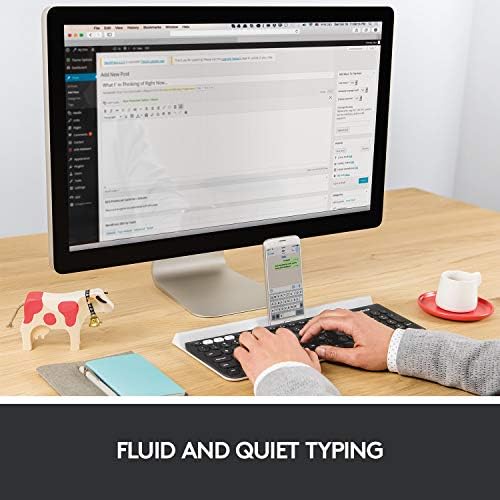
- Built-in cradle holds phones and tablets at a comfortable reading angle
- Full-size layout with numpad — no compromises on key coverage
- Quiet, comfortable keys with solid 2mm travel
- Works with Windows, macOS, iOS, Android, and Chrome OS
- 2-year battery life on two AAA batteries
Could be better
- No keyboard backlight
- White speckle design shows dirt and oils over time
- Larger footprint than a tenkeyless — needs a wide desk
- Plastic build feels average for an $80 keyboard
Full Review
The K780 solves a specific problem extremely well: working across multiple devices without a cluttered desk or constant re-pairing. If your workflow touches a work laptop, a personal Mac, and an iPad, this keyboard was built for exactly that.
Device Switching That Actually Works
The Easy-Switch button at the top-left cycles through three paired devices. Pairing is straightforward — hold the button for three seconds and the keyboard broadcasts on that channel. Switching takes under a second in practice, fast enough that you don’t lose your train of thought. Logitech’s Bluetooth implementation is reliable here; reconnection after wake is snappy and doesn’t require babysitting.
One channel also accepts Logitech’s USB Unifying Receiver for systems where Bluetooth isn’t an option, like locked-down work computers.
The Cradle Is Genuinely Useful
The integrated rubber cradle along the top edge holds phones and tablets upright at a comfortable reading angle while you type. It fits everything from iPhone minis to 12.9-inch iPad Pros. This isn’t a gimmick — having your phone propped up and in view while you type on the same keyboard reduces context-switching and keeps the desk tidier than a separate stand.
Typing Feel
The keys are quiet and consistent, roughly on par with Apple’s Magic Keyboard in terms of travel but softer on the landing. Typists coming from a mechanical keyboard will find the feedback underwhelming, but for an office keyboard used around other people, the low noise profile is a real advantage. The full-size layout with numpad means no compromises for spreadsheet-heavy work.
There’s no backlight, which matters if you work in dim conditions. That’s the single biggest feature gap at this price.
Build and Design
The white speckle colorway looks clean on a modern desk but picks up fingerprints and grime faster than a dark keyboard. The plastic frame is sturdy enough but doesn’t feel premium. Battery life is legitimately excellent — two AAA batteries last about two years with normal use, far better than rechargeable keyboards that need a cable every few weeks.
Who Should Buy This
The K780 is the right keyboard if you regularly type on three different devices and want them all within reach without re-pairing or juggling multiple keyboards. It’s especially well-suited for Mac/PC/iPad setups. If you only ever use one device, a better-built single-device keyboard exists at this price. And if you need backlighting, look at the MX Keys instead — but expect to pay more.


