Logitech MX Creative Console
A two-piece keypad and dial controller built for Adobe, Final Cut, and Zoom workflows — Logitech's answer to the Stream Deck for designers and editors who don't stream.
Price may vary. As an affiliate, we earn from qualifying purchases.
What we like
- Tactile contextual dial is genuinely better than a touchscreen for scrubbing timelines and adjusting sliders
- Deep Adobe integration with pre-built plugins for Photoshop, Lightroom, Premiere Pro, and After Effects
- Final Cut Pro support added in 2025 makes it viable for Mac video editors
- Keypad and dialpad are separate pieces, so you can position them independently around your setup
- Comes with a 3-month Adobe Creative Cloud membership, softening the price
Could be better
- Logi Options+ software is still less mature than Elgato's Stream Deck app — fewer community plugins
- Only 9 LCD keys vs the Stream Deck MK.2's 15 — you'll lean on profile switching
- USB-C wired only, no wireless or Bluetooth option
- Action Ring overlay can feel gimmicky compared to direct key presses
Full Review
The MX Creative Console is Logitech’s first serious play at the macro pad category, and it’s clearly aimed at a different user than the Elgato Stream Deck. Where Elgato courts streamers and OBS power users, Logitech is going after the photographer editing in Lightroom, the designer in Photoshop, and the video editor in Premiere or Final Cut. After living with it for a few weeks, the targeting works.
The Dial Is the Real Story
The 9 LCD keys are useful, but the contextual dial is what justifies the price. In Lightroom, twisting it scrubs through exposure, contrast, or any slider you’ve assigned. In Premiere, it becomes a jog wheel for timeline scrubbing. The tactile feedback — actual rotation with detents — beats dragging a slider with a mouse for fine adjustments. This is the part you can’t replicate with a Stream Deck no matter how many keys you stack.
Adobe Integration Is Excellent, Everything Else Is Catching Up
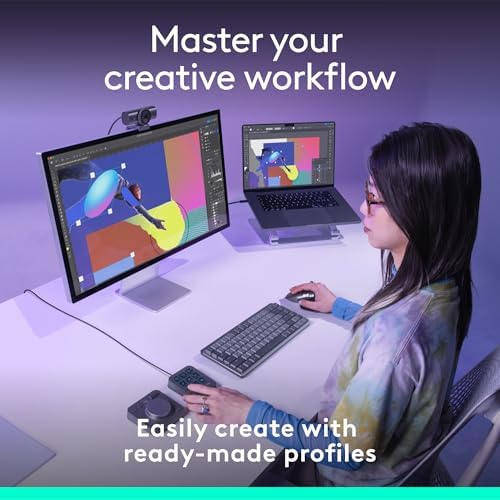
Logi Options+ ships with deep, pre-built profiles for the entire Adobe Creative Cloud suite, and they actually work without configuration. Final Cut Pro support landed in 2025 and is solid, though not as polished as the Adobe plugins. Zoom controls (mute, video on/off, raise hand) are handy for remote workers in back-to-back meetings. Beyond that, the third-party plugin ecosystem is thin compared to Stream Deck’s. If you need Home Assistant, OBS, or niche dev tooling, Elgato still wins.
Build Quality and Daily Use
The two-piece design is more clever than it sounds. The keypad sits to the left of your keyboard for shortcuts; the dialpad goes to the right of your mouse for adjustments. Both are weighty enough to stay put without rubber feet sliding. The LCD keys are sharp and bright, and key icons update contextually when you switch apps — Photoshop tools appear when Photoshop is focused, then morph to Premiere controls when you switch.
MX Creative Console vs Elgato Stream Deck
If you stream, run a homelab, or want a thriving plugin marketplace, get a Stream Deck MK.2. If you’re a designer, photographer, or video editor who lives in Adobe or Final Cut, the MX Creative Console is the better tool — the dial alone changes how you work. They’re not really the same product despite looking similar.
Who Should Buy This
Buy this if you spend hours a day in Photoshop, Lightroom, Premiere, or Final Cut and you’re tired of fishing for keyboard shortcuts. The dial pays for itself the first time you color-grade a clip without touching the trackpad. Skip it if you primarily need OBS scene switching or want a sprawling third-party plugin library — Elgato is still the right call there. Also skip it if you only use Microsoft Office or browser-based tools, since the deepest integrations are Adobe-first and you won’t get the full benefit.


