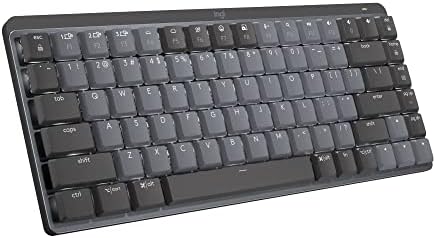
Logitech MX Mechanical Mini Keyboard
A compact wireless mechanical keyboard with low-profile Kailh switches — Logitech's answer for MX Keys users who want real tactile feedback without going full enthusiast.
Price may vary. As an affiliate, we earn from qualifying purchases.
What we like
- Low-profile switches feel responsive without the height of standard mechanicals
- Excellent multi-device support — connect up to 3 devices via Bluetooth or Logi Bolt
- Smart backlighting adjusts to ambient light, extending battery life
- Premium metal top plate feels solid and looks the part on any desk
- Up to 10 months battery life with backlighting off
Could be better
- Low-profile switches won't satisfy traditional mechanical keyboard enthusiasts
- Keycap font and layout are polarizing — function row doubles as media/shortcut layer
- No USB-A Logi Bolt receiver included in all configurations
Full Review
Logitech’s MX line has long catered to productivity-focused users who want something better than a membrane keyboard without going down the enthusiast rabbit hole. The MX Mechanical Mini is that logic applied to a compact form factor — a 75% wireless keyboard with low-profile mechanical switches and the same polished build quality MX users expect.
Switches and Typing Feel
The Kailh low-profile switches are the centerpiece here, and they land in a genuinely useful middle ground. They’re shallower than standard MX-style or Cherry switches — around 3.2mm total travel versus 4mm — which means faster actuation and less finger fatigue during long typing sessions. The Tactile Quiet variant has a noticeable bump without the clatter, making it office-friendly. Clicky and Linear variants are also available if you prefer something more decisive or completely smooth.
What you won’t get is the deep, satisfying thock of a full-size enthusiast board. If you’ve been hot-swapping switches and building custom boards, the MX Mechanical Mini will feel like a compromise. For everyone else — including MX Keys users curious about mechanicals — it’s a marked improvement in feedback without the learning curve.
Build Quality and Design
The aluminum top plate is the first thing you notice. It keeps the keyboard rigid and gives it a premium weight (612g) that keeps it planted on the desk. The keycap legends are sharp, and the dark graphite colorway looks professional without being boring.
The 75% layout fits a function row, arrow keys, and a small cluster of navigation keys into a footprint much smaller than a full-size board. The tradeoff is a steeper function key learning curve — F-row keys double as media controls and shortcuts by default, flipped with the Fn key. It takes a few days to internalize, but becomes natural quickly.
Wireless and Software
Bluetooth 5.1 and Logi Bolt are both supported, and the three-device Easy-Switch buttons along the top make context-switching between a Mac, PC, and iPad seamless. Pairing is reliable and reconnect times are fast — no fumbling before a meeting.
Logitech Options+ software adds per-app customization, letting you remap keys and set custom actions by application. It’s genuinely useful and not the bloated experience some peripheral software delivers. The smart backlighting uses the ambient light sensor to dim automatically, which meaningfully extends battery life in well-lit rooms.
Who Should Buy This
The MX Mechanical Mini is the right keyboard if you’re an MX Keys user who wants more tactile feedback, or a productivity-focused typist who wants wireless mechanical without a full-size footprint. It’s also a strong pick for anyone working across multiple devices — the multi-device switching is best in class.
Skip it if you’re a dedicated mechanical enthusiast chasing a specific switch feel or deep customization. If you want something closer to a traditional keyboard profile, the full-size MX Mechanical is worth considering. If you don’t need mechanical feedback at all, the MX Keys Mini at a lower price point does everything else just as well.


