Logitech POP Keys Wireless Mechanical Keyboard
A compact mechanical keyboard with customizable emoji keys and bold colorways for home office workers who want personality on their desk.
Price may vary. As an affiliate, we earn from qualifying purchases.
What we like
- Genuine tactile mechanical switches at a sub-$80 price
- Four customizable emoji keys with five extras in the box
- Pairs with up to three devices over Bluetooth or Logi Bolt
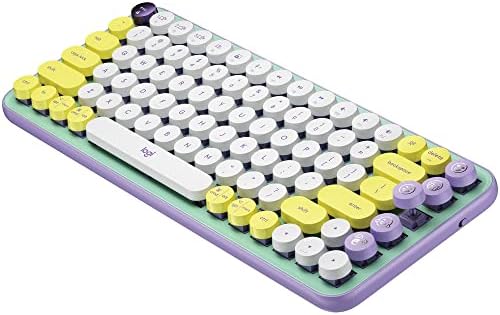
- Three bold colorways that look nothing like a standard office keyboard
- Claimed three-year battery life on two AAAs
Could be better
- Louder than most mechanical keyboards — not ideal for shared rooms
- No backlighting at all
- Round keycaps take a few days of adjustment
- Runs on AAA batteries instead of a rechargeable cell
Full Review
The POP Keys is Logitech’s attempt to make a mechanical keyboard that doesn’t look like a mechanical keyboard. No gaming RGB, no gunmetal aluminum, no backlit gradient — just round retro keycaps in Mint, Yellow, or Rose, and four dedicated emoji keys that make your Slack coworkers mildly suspicious.
Build and Typing Feel
The tactile Kailh switches have a defined bump and a clicky, typewriter-adjacent sound that lands somewhere between a brown and blue switch. Typing is satisfying once you’re used to the round keycaps, but the first two days are an adjustment — the circular shape means your fingers have less margin for error than on a standard chiclet key. After a week it stops being an issue.
It’s loud. Not mechanical-gaming-board loud, but noticeably louder than a scissor-switch keyboard, and meetings from a home office will hear you typing. If you share a room with a partner on calls, think twice.
Emoji Keys and Logi Options Software
The four emoji keys across the top right are the headline feature, and they actually work. Each one sends a Unicode emoji directly into any text field — not a shortcut, the real character. You program them through Logi Options+, which lets you assign any emoji (or a shortcut, or a macro) to each key. Five spare keycaps come in the box in case you want to swap in different faces.
It’s a gimmick, but a functional one. If you live in Slack, Discord, or Notion, hammering a 🎉 key is more fun than it has any right to be.
Connectivity and Daily Use
Multi-device switching works through three dedicated keys — tap one to swap between your work laptop, personal machine, and phone. Pairing is instant over Bluetooth, and the included Logi Bolt dongle is there if you need a cable-free USB connection without Bluetooth flakiness.
Battery life is genuinely excellent. Two AAAs that Logitech claims will last three years, and while I can’t verify that yet, the battery indicator hasn’t budged in four months.
POP Keys vs. Keychron
If you want the fullest mechanical experience — hot-swappable switches, aluminum frame, QMK/VIA support — get a Keychron K3 Pro instead. The POP Keys isn’t trying to win that fight. It’s aimed at the person who wants a mechanical keyboard that looks like a piece of furniture, not a piece of tech.
Who Should Buy This
Buy the POP Keys if you want a compact mechanical keyboard with personality and don’t care about backlighting or customization beyond the emoji keys. It’s perfect for creatives, writers, and anyone whose desk setup leans more Pinterest than Linus Tech Tips. If you need a quiet keyboard for shared spaces, want a truly tweakable board, or care about RGB, skip this and look at the Keychron K3 Pro or Logitech MX Keys S.


