Mokibo Fusion Universal Touchpad Keyboard
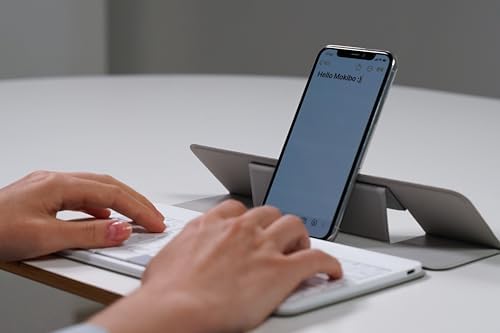
A travel keyboard with a touchpad hidden inside the keys themselves — perfect for anyone who hates packing a separate mouse.
Price may vary. As an affiliate, we earn from qualifying purchases.
What we like
- Entire key surface doubles as a touchpad — no separate mouse needed
- Bluetooth multi-device pairing switches between three devices instantly
- Works with iPad, Mac, Windows, Android, and Chrome OS
- 60-hour active battery from a 2-hour USB-C charge
- Slim, light, and genuinely packable
Could be better
- Touchpad gesture takes a few days to retrain your hands
- Key feel is shallow — fine for travel, not for 8-hour days
- No backlight
- Pricey for a portable keyboard
Full Review
The Mokibo Fusion Universal is the only keyboard I’ve used where the touchpad lives inside the keys. Tap a key, you type. Slide a finger across the keys, you move the cursor. It sounds like a gimmick. After a week of travel, it’s the thing I missed most when I switched back to a regular keyboard.
The Touchpad-In-Keys Trick
Capacitive sensors run beneath the entire key surface. A single finger touch becomes a cursor; pressing actuates a keystroke. The two modes are surprisingly easy to keep separate — Mokibo’s firmware reads timing and pressure well enough that I rarely fired off a stray letter while moving the mouse.
Two-finger scroll works. Tap-to-click works. Pinch-to-zoom works on iPad. It’s a real trackpad, just hidden under the QWERTY.
Travel-First Build
It’s thin, light, and folds flat into a bag pocket. The chassis is plastic but doesn’t creak. USB-C charges it in about two hours and the 60-hour rating held up across a two-week trip with daily use — I charged it once.
Multi-device pairing is the unsung feature: Fn+1/2/3 switches between an iPad, a MacBook, and a phone in under a second. No fumbling with Bluetooth menus mid-coffee-shop.
Where It Falls Short
The key travel is shallow and the feel is closer to a 2018 MacBook than a real mechanical board. For a few hours on a plane, fine. For writing all day at a desk, you’ll want something with more depth. There’s also no backlight, which is a real omission at this price.
And the touchpad mode, while clever, isn’t as precise as a dedicated trackpad. Photo editing or pixel-pushing in Figma — use a real mouse.
Who Should Buy This
Buy the Mokibo Fusion Universal if you travel light and resent every cable, dongle, and mouse in your bag. It’s a one-device input solution for people who work from cafes, airports, and hotel rooms on an iPad or laptop. If you want a daily-driver desktop keyboard, look at the Keychron K3 Ultra or any low-profile mechanical instead — the Mokibo’s job is to disappear into a backpack, not anchor a workstation.


