NuPhy Air60 V2 60% Wireless Mechanical Keyboard
A 64-key low-profile mech that's the best travel and secondary keyboard money can buy under $150.
Price may vary. As an affiliate, we earn from qualifying purchases.
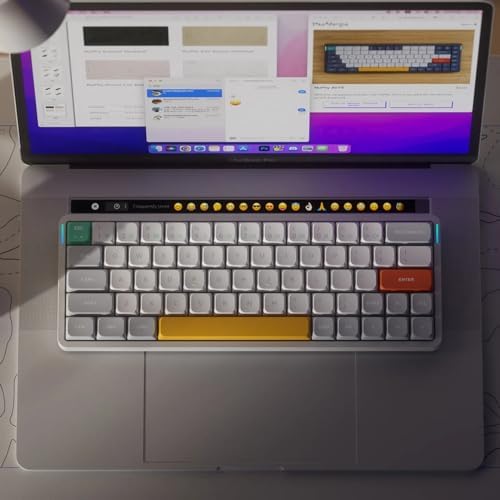
What we like
- Genuinely portable — fits in any laptop sleeve
- 1000Hz wireless polling feels indistinguishable from wired
- QMK/VIA support means full remapping freedom
- Pairs with 4 devices and swaps between them instantly
Could be better
- No arrow keys or function row takes adjustment
- Low-profile Gateron switches feel shallow if you're used to standard MX
- Backlight chews through battery fast in 2.4GHz mode
Full Review
The Air60 V2 is what happens when NuPhy takes everything that worked about the Air75 V2 and chops off another row of keys. The result is a slim aluminum slab that disappears into a laptop sleeve and forgets it’s there until you need it. If you live out of a backpack or already have a full keyboard on your main desk, this is the one.
Build and Portability
The aluminum frame keeps the whole thing under 17mm thick at the front edge. It feels dense in the hand without being heavy — about 480g — and the side light bars (caps lock and battery on one side, connection mode on the other) are a smart bit of glanceable feedback. The PBT keycaps are sharp and don’t develop shine quickly. There’s no flex anywhere, which is rare at this price.
Typing Feel
Low-profile Gateron switches are the whole pitch here, and they’re divisive. Travel is short, actuation is fast, and the sound is clackier than you’d expect from a thin board. If you’re coming from a standard MX layout, the first day feels like typing on a deck of cards. By day three it’s fine. The Cowberry tactile and Wisteria linear options are the picks — the standard Reds and Browns feel generic by comparison.
Wireless and Software
The 1000Hz polling over 2.4GHz is the headline spec, and it earns its keep. Latency is genuinely imperceptible. Bluetooth 5.1 covers the other three pairing slots, and switching between them is a Fn-combo away. QMK/VIA support means you’re not stuck with NuPhy’s stock software — remap the whole thing in a browser, save layers, done. The trade-off is battery: with backlight on in 2.4GHz mode, expect 12-15 hours before topping up.
Air60 V2 vs Air75 V2
The Air75 V2 is the closer comparison, not full-size keyboards. The 75 adds a function row and dedicated arrows for about $20-30 more. If you use the function row daily (developers, video editors, anyone living in shortcuts), the Air75 V2 is the smarter buy. The Air60 V2 wins on pure portability and desk footprint — the function layer handles arrows and F-keys via Fn combos, and most people adapt within a week.
Who Should Buy This
Get the Air60 V2 if you want a travel keyboard that doesn’t feel like a compromise, or a secondary board for a couch/bedroom setup. It’s also a strong pick for minimal desk setups where every millimeter matters. Skip it if you rely on a function row for shortcuts, hate adjustment periods, or want a keyboard that’s also a desk centerpiece — for that, the Air75 V2 or a full-size board makes more sense.


