OBSBOT Tiny 2 Lite 4K AI PTZ Webcam
A pocket-sized 4K PTZ webcam with a 1/2-inch sensor and AI auto-tracking that keeps remote presenters perfectly framed without lifting a finger.
Price may vary. As an affiliate, we earn from qualifying purchases.
What we like
- AI auto-tracking actually works — pans and tilts smoothly to follow you around the desk
- Large 1/2-inch sensor delivers genuinely good low-light video at 4K 30fps
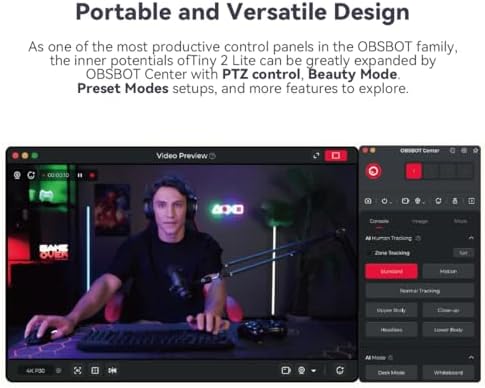
- Gesture Control 2.0 lets you start tracking and zoom without touching the keyboard
- 2-axis gimbal with 300° pan and 180° tilt covers an entire room
Could be better
- USB 2.0 only — no UVC 1.5 high-bitrate option that the full Tiny 2 supports
- OBSBOT Center software is required to unlock the best features
- No voice control or whiteboard mode (those are Tiny 2 exclusives)
Full Review
The Tiny 2 Lite is OBSBOT’s answer to a simple question: how much of the flagship Tiny 2 experience can you get for $200? The answer, surprisingly, is most of it. You lose voice control, whiteboard mode, and the bigger 1/1.5-inch sensor — but you keep the motorized gimbal, the AI tracking, and 4K capture, which is the part most remote workers actually care about.
Build and Setup
The camera is genuinely tiny — about the size of a stack of poker chips — and the magnetic base snaps onto either the included mini tripod or a monitor mount. Setup is plug-and-play over USB-C: Zoom, Teams, Google Meet, and OBS all see it as a standard webcam without any drivers. Install OBSBOT Center if you want gesture control, preset positions, and tracking mode tweaks.
AI Tracking and Gesture Control
This is where the Tiny 2 Lite earns its price. Raise your open palm and it locks onto you; the gimbal physically pans and tilts to keep you centered as you move around the desk or stand up to write on a whiteboard. The tracking is smooth rather than twitchy, with adjustable speed and three framing modes (close-up, half-body, full-body). For anyone teaching, demoing products, or running a hybrid meeting where the speaker moves, it’s a different category from a fixed-lens webcam.
Image Quality
The 1/2-inch sensor pulls in noticeably more light than typical 1/3-inch webcams. Daylight 4K is sharp and the auto-HDR handles bright window backlight without crushing your face into a silhouette. Low-light is good, not flagship — the Logitech MX Brio still has a slight edge in dim rooms, but the MX Brio can’t physically follow you around.
How It Compares
Against the Insta360 Link 2, the Tiny 2 Lite is cheaper and easier to mount, with a similar tracking experience. Against the regular Tiny 2, you save about $130 by giving up voice control and the larger sensor. If you want the absolute best static image, get the MX Brio. If you want a camera that moves, this is the value pick.
Who Should Buy This
Buy the Tiny 2 Lite if you present, teach, or stream from a desk and want the camera to follow you instead of forcing you to sit perfectly still. Skip it if you never leave your chair during calls — a fixed webcam like the MX Brio or Elgato Facecam MK.2 will give you a slightly cleaner image for less money.


