Razer BlackWidow V4 75% Mechanical Keyboard
A compact wired 75% mechanical keyboard with hot-swap switches, an aluminum top plate, a magnetic wrist rest, and Razer's tactile Orange switches — built for gamers who also get real work done.
Price may vary. As an affiliate, we earn from qualifying purchases.
What we like
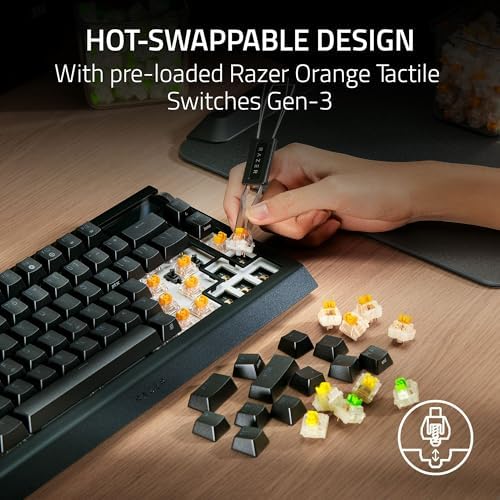
- Hot-swappable switches — easy to customize without soldering
- 5052 aluminum top plate keeps the board planted and flex-free
- Magnetic wrist rest included in the box
- Roller and dedicated media keys for quick volume/track control
- Razer Orange switches are tactile without being ear-splitting
Could be better
- Wired only — no Bluetooth or 2.4GHz wireless (that's the V4 Pro 75%)
- Razer Synapse required for full configuration
- ABS keycaps wear faster than PBT alternatives
Full Review
The Razer BlackWidow V4 75% sits in a tricky space: it’s clearly aimed at gamers, but the 75% layout, Orange switches, and included wrist rest make a strong case for dual-use productivity. If you want a single wired keyboard that works for both late-night gaming and full workdays — and you don’t need wireless — this is one of the better arguments for it.
Build Quality and Layout
The chassis feels planted. The 5052 aluminum top plate has no flex, and the keys don’t wobble under fast typing. The 75% layout is the sweet spot for most people who want a compact board but refuse to give up arrow keys or the function row — both are present here, just tighter than a full-size. A thick layer of fire-resistant tape on the underside of the PCB gives the board a satisfying, “poppy” typing sound rather than a hollow rattle.
The magnetic wrist rest snaps on cleanly and doesn’t shift during use. It’s a small detail that adds a lot to all-day comfort, and it’s rare to see it included rather than sold separately.
Typing and Switch Feel
Razer Orange switches are tactile without being clicky — you feel the bump but your coworkers won’t hear it. Actuation is light enough for speed without causing fatigue on long writing sessions. If you’re coming from a linear switch keyboard, expect a short adjustment period.
Hot-swap support means you’re not locked into Oranges forever. Pull the switches, drop in whatever you prefer — most standard 3-pin or 5-pin mechanical switches drop straight in, no soldering required.
Connectivity and Controls
This is a wired board over USB-C — if you specifically want wireless, the BlackWidow V4 Pro 75% is the Bluetooth/2.4GHz model to look at instead. What the wired V4 75% adds for productivity is a roller and dedicated media keys, so adjusting volume or skipping a track never pulls you out of a document or a match. Razer’s Snap Tap mode is on board for competitive gaming.
Software and Customization
Razer Synapse is required to remap keys, configure macros, or set up per-key lighting profiles. It’s a capable tool but it’s heavyweight software. If you’re anti-bloat, you can get by with the keyboard’s onboard memory for basic profiles, but you’ll need Synapse at least once for initial setup.
Who Should Buy This
Buy this if you want one wired keyboard for both work and play and don’t want to compromise on layout or feel. The 75% form factor, tactile switches, roller/media keys, and included wrist rest make it genuinely comfortable for long typing sessions, while hot-swap and Snap Tap keep it relevant for gaming. Skip it if you need wireless (look at the V4 Pro 75%), or if you hate software dependencies and want a more minimal board — the Keychron lineup is worth a look in that case.


