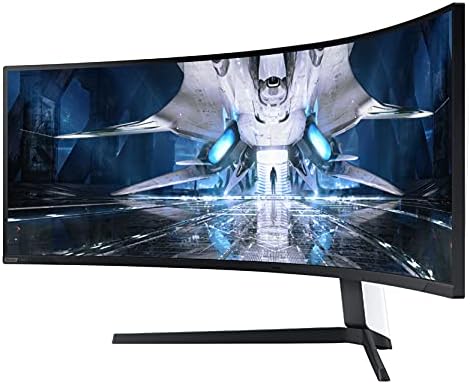
Samsung 49" Odyssey Neo G9 Curved Monitor
A 49-inch Mini LED super-ultrawide that replaces a dual-monitor setup with one seamless, 240Hz, 5120x1440 display.
Price may vary. As an affiliate, we earn from qualifying purchases.
What we like
- 5120x1440 resolution equals two 27" QHD monitors with zero bezel in the middle
- Quantum Mini LED backlight with 2,048 local dimming zones produces exceptional HDR contrast
- 240Hz refresh rate and 1ms response time keep everything from spreadsheets to shooters buttery smooth
- 1000R curvature wraps the display around your peripheral vision — less head-turning during long work sessions
Could be better
- Sheer size demands a desk at least 55 inches wide and a sturdy surface
- Not every app scales gracefully to 32:9 — expect windowed workarounds
- Mini LED blooming is visible in high-contrast scenes if you look for it
Full Review
The Neo G9 49” is the monitor you buy when you’ve outgrown a dual-monitor setup and want to stop fighting with bezels, mismatched color calibration, and the awkward neck-turn between screens. At 5120x1440, it’s effectively two 27-inch QHD displays fused into one continuous, curved panel. For power users running a video timeline next to a preview window, or a code editor next to docs and a terminal, there is no substitute.
The Mini LED Difference
Older versions of the G9 used edge-lit VA panels that struggled with HDR. The Neo G9 swaps in a Quantum Mini LED backlight with over 2,000 local dimming zones, and the upgrade is obvious the moment you turn it on. Dark scenes in movies and games show real contrast instead of the murky gray of typical VA panels. Highlights pop. If you’ve only used IPS office monitors, the difference feels closer to an OLED TV than a desktop display.
Productivity Reality Check
The 32:9 aspect ratio is a productivity cheat code — once you set up FancyZones on Windows or Rectangle/Raycast on macOS to snap windows into thirds or quarters, you won’t go back. That said, some apps don’t know what to do with this much horizontal space. Slack and Teams will stretch their sidebars absurdly wide. Full-screen web browsing is uncomfortable. The trick is treating the monitor as three zones, not one screen.
Gaming Is the Secondary Use Case
Samsung markets this as a gaming monitor, and at 240Hz with 1ms response, it absolutely delivers — but the workflow benefits are the real reason to spend $1,300. If you only game, a 27” 1440p OLED at the same price will look better. The Neo G9 earns its keep when you spend 8 hours a day working on it and then happen to also play games well on it.
Who Should Buy This
Buy the Neo G9 49” if you currently run dual monitors, work across multiple apps simultaneously, and want to eliminate the bezel gap and calibration headache of a multi-display setup. It’s ideal for video editors, traders, developers, and anyone who lives in spreadsheets. If you mostly run one app at a time, or your desk is under 55 inches wide, get a single 32” 4K monitor instead — you’ll save money and wall space.


