Wooting 60HE+ Rapid Trigger Gaming Keyboard
The keyboard that defined rapid trigger — Hall Effect switches, 0.1mm actuation, and 8000Hz polling in a compact 60% layout.
Price may vary. As an affiliate, we earn from qualifying purchases.
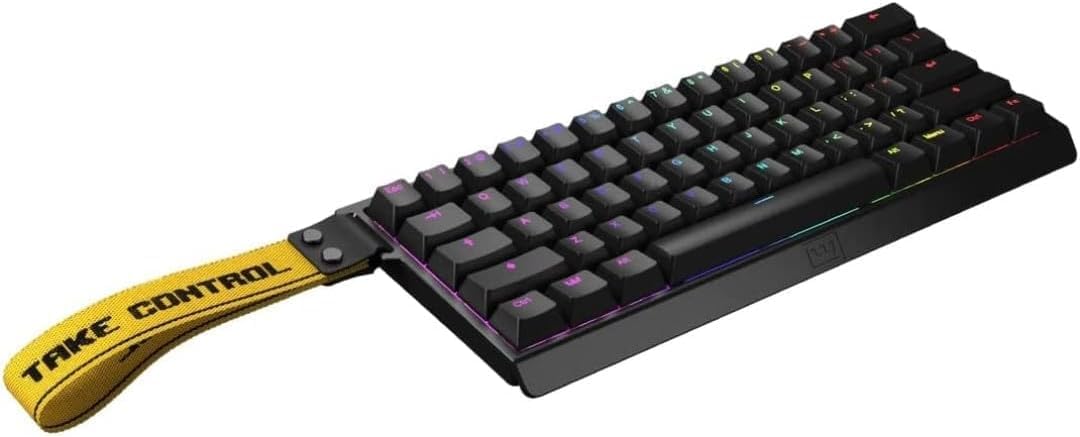
What we like
- Lekker L60 Hall Effect switches feel uncannily fast and consistent
- Adjustable actuation from 0.1mm to 4.0mm per key
- 8000Hz polling rate eliminates input latency you didn't know you had
- Wootility software is the gold standard — deep customization, no bloat
- PBT keycaps and solid aluminum-frame construction punch above the price
Could be better
- 60% layout means no arrows, function row, or nav cluster without layers
- Wired-only — no wireless or Bluetooth option
- Backorders are common; Wooting often sells in batches
Full Review
The Wooting 60HE+ is the keyboard that turned “rapid trigger” from a niche gaming term into a category. Every Hall Effect board on the market — Keychron, Razer, Aula, the Steelseries Apex Pro line — is measured against this one. After spending months with it as a daily driver, I understand why.
What Hall Effect Actually Feels Like
Mechanical switches have one fixed actuation point. Hall Effect switches use a magnet and a sensor to detect the key’s exact position continuously, which means you can set actuation anywhere from a featherlight 0.1mm to a deliberate 4.0mm — per key. Set the spacebar deep so you don’t trigger it accidentally. Set WASD shallow for instant response. The Lekker L60 switches themselves feel like a smooth linear with zero scratch and a satisfying 40g actuation force.
Rapid trigger is the headline feature: the key resets the moment you start lifting it, not at a fixed reset point. For gaming this is transformative. For typing, it’s mostly invisible — but when paired with shallow actuation, fast typists genuinely feel the keyboard get out of the way.
Is It Worth It for Typing, Not Just Gaming?
Honest answer: rapid trigger itself doesn’t make you a better typist. But the build quality, the consistency of the switches, and the 8000Hz polling rate add up to a typing experience that feels noticeably more responsive than a standard mechanical board. If you’re coming from a Keychron Q-series or a GMMK Pro, you’ll feel the difference within a week.
The Wootility software is the real moat. Compared to Keychron’s Launcher or Razer Synapse, it’s faster, web-based, and has zero telemetry nonsense. You can flash settings to the keyboard and unplug — everything persists.
The 60% Layout Trade-Off
This is the biggest decision you’ll make. No arrow keys. No function row. No Home/End/PgUp/PgDn unless you hold the Fn layer. For coders, writers, and anyone who lives in spreadsheets, this is a real adjustment. Wooting’s layer system is excellent — arrows on IJKL with Fn held works well — but it takes two to three weeks to internalize.
If you can’t live without dedicated arrows, the Wooting 80HE adds a function row and arrow cluster for about $50 more. Most home office buyers will be happier there. If desk space is at a premium and you already use a 60% or 65%, the 60HE+ is the move.
Wooting vs Keychron HE Boards
Keychron’s K2 HE and Q1 HE are cheaper and offer hot-swap sockets, wireless options, and full-size or TKL layouts. They’re great keyboards. But Wooting’s firmware and software are still a generation ahead — lower latency, more granular per-key tuning, and a more polished Wootility experience. If rapid trigger is the reason you’re buying, Wooting is still the benchmark. If you want a great Hall Effect board with a more practical layout and wireless, Keychron wins on value.
Who Should Buy This
Buy the Wooting 60HE+ if you’re a competitive gamer, a fast typist who appreciates absurd levels of polish, or someone who already loves the 60% form factor. It’s the most refined Hall Effect keyboard you can buy, and the software ecosystem alone justifies the premium.
Skip it if you need arrow keys at all times, want wireless, or aren’t going to actually use the rapid trigger and per-key actuation features — at that point you’re paying for tech you’ll never touch, and a Keychron Q1 or Q3 Max is a smarter buy.


