Anker Prime Docking Station 14-in-1
Anker's premium 14-port dock with a built-in smart display showing real-time power draw across every connected device — the visibility upgrade for cable-heavy desks.
Price may vary. As an affiliate, we earn from qualifying purchases.
What we like
- Built-in smart display shows live wattage per port — no guessing what's drawing power
- 160W max output handles a 16-inch MacBook Pro plus peripherals without throttling
- 14 ports cover almost every desk scenario: dual 4K displays, SD/microSD, audio, Ethernet
- 10Gbps USB-C data ports are fast enough for external SSDs and capture devices
- Vertical stand design saves desk space compared to horizontal docks
Could be better
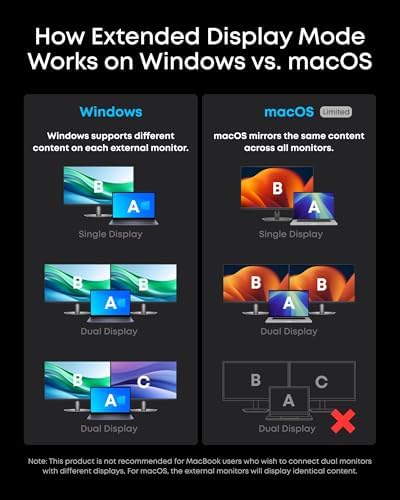
- Not Thunderbolt — single 4K@60Hz or dual 4K@30Hz is the display ceiling for Macs
- $249 puts it in Thunderbolt 4 dock territory where some buyers will want TB
- Smart display is useful but mostly novelty after the first week
Full Review
The Anker Prime Docking Station is the company’s flagship USB-C dock and the first one I’ve used where I actually pay attention to the dock itself. The small color screen on the front shows live power draw for every connected device — your laptop pulling 92W, the SSD on USB-C pulling 4W, the phone charger pulling 18W. It sounds like a gimmick, and for the first day it kind of is. Then you start spotting things: a peripheral drawing more than it should, a cable that’s not negotiating PD properly, a charger that quietly dropped to 5W when you expected 60W.
Power and Charging
160W is generous. The host port delivers up to 100W, which is enough for a 16-inch MacBook Pro under load, and the remaining budget is split smartly across the downstream ports based on what’s actually drawing. I ran a laptop, two monitors, an SSD, and a phone off it without ever seeing the host port drop below the negotiated wattage. This is where the smart display earns its keep — you can see exactly how the power budget is being allocated in real time instead of guessing why your laptop is charging slowly.
Display and Data
This is a USB-C dock, not Thunderbolt, and that’s the main thing to understand before buying. On a Mac you get either one 4K display at 60Hz or two 4K displays at 30Hz. On a Windows laptop with DisplayPort 1.4 alt mode you can push dual 4K at 60Hz. If you need dual 4K@60Hz on a Mac, you want the Anker Prime TB5 dock or a proper Thunderbolt 5 hub instead — see our Thunderbolt vs USB-C hub guide for the breakdown. Data transfer maxes at 10Gbps, which is fast enough for any SSD short of the latest NVMe enclosures.
Anker Prime vs Anker 777
If you’re cross-shopping Anker’s lineup, the question is whether the smart display is worth the premium. The Anker 777 is a Thunderbolt 4 dock with no display but better video output. The Anker 575 is a stripped-down USB-C hub at a third of the price. The Prime sits between them — more ports than the 575, more power monitoring than the 777, but USB-C instead of Thunderbolt. Pick it if you value port count and visibility over Thunderbolt bandwidth.
Build and Footprint
The vertical stand orientation is a real win. Most 14-port docks sprawl horizontally and eat desk space; this one stands up like a small router and tucks neatly behind a monitor. The chassis is metal and runs slightly warm under heavy load but never hot. Cable management is reasonable as long as you commit to the back-side ports for permanent connections and reserve the front for temporary stuff.
Who Should Buy This
Buy the Anker Prime Docking Station if you want a port-dense USB-C dock and you genuinely care about seeing what’s drawing power on your desk. It’s a strong fit for desk minimalists running one laptop with several peripherals who want a single, attractive hub instead of a tangle of chargers. Skip it if you need dual 4K@60Hz on a Mac, dual external GPUs, or anything else that demands real Thunderbolt bandwidth — in that case spend the extra $50–$100 on a TB4 or TB5 dock and don’t look back.


