Anker 575 USB-C Hub (12-in-1, Triple Display)
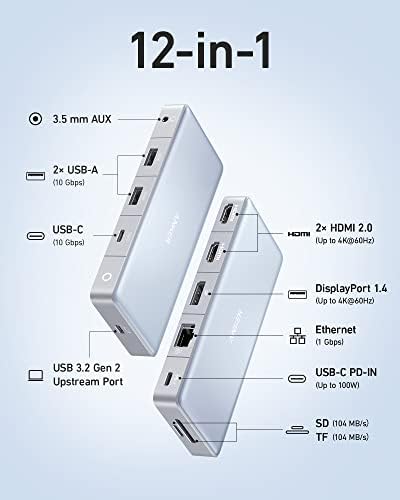
A 12-in-1 USB-C hub that drives three monitors over dual HDMI and DisplayPort — a budget-friendly alternative to a full Thunderbolt dock for Windows laptops.
Price may vary. As an affiliate, we earn from qualifying purchases.
What we like
- Triple monitor output via dual HDMI plus DisplayPort
- 10 Gbps USB-C and USB-A data ports for fast transfers
- 85W pass-through charging handles most ultrabooks
- Far cheaper than a Thunderbolt 4 dock with similar display options
Could be better
- Triple-display mode caps at 2K@60Hz per screen
- Not compatible with MacBooks for extended displays
- Power adapter is sold separately
Full Review
The Anker 575 sits in an awkward but useful spot: it’s a USB-C hub, not a Thunderbolt dock, but it can still push three external displays from a single cable. For Windows laptop users who want a multi-monitor setup without spending $300+ on a full dock, this is one of the most practical options on the market.
Triple Display Performance
The headline feature works as advertised — two HDMI 2.0 ports plus one DisplayPort 1.4 — but the resolution math matters. A single external monitor runs 4K@60Hz, dual monitors drop to 4K@30Hz, and once you light up all three, you’re capped at 2K (2560x1440) at 60Hz per panel. For productivity work that’s perfectly usable. If you were planning to drive three 4K screens at full refresh, you need a Thunderbolt dock instead.
It also relies on DisplayPort Alt Mode and DisplayLink-style multiplexing, which means MacBooks can mirror but not extend across all three outputs. Windows laptops with proper USB-C video support are the target.
Build and Day-to-Day Use
The 575 is a small black slab with a 1.6-foot captive USB-C cable. It runs warm under load — normal for a hub doing this much work — but never hot enough to be alarming. The 10 Gbps data ports are genuinely useful for external SSDs, and Gigabit Ethernet is a welcome backup when Wi-Fi gets crowded.
The 85W pass-through is the one rough edge. It’ll keep a 13” or 14” ultrabook topped up indefinitely, but a 16” gaming laptop under load will slowly drain. You also have to bring your own USB-C charger, which adds $30-50 to the real cost.
How It Compares
The closest competitor is the Ugreen Revodok Pro 213, which is cheaper but only drives two displays. Step up to the Anker 778 Thunderbolt dock and you get true 4K triple-display and 100W PD, but you’ll pay roughly twice as much and your laptop needs Thunderbolt 4. The 575 is the sweet spot if your laptop is USB-C only and 1440p triple-display is enough.
Pair it with a dual monitor arm and a couple of solid 27” panels and you’ve built a serious workstation for under $700 total.
Who Should Buy This
Buy the Anker 575 if you have a Windows ultrabook without Thunderbolt 4 and you want to run three monitors from one cable without spending dock money. It’s also a smart pick for anyone who already owns a 4K main monitor and wants to flank it with two 1440p side displays. Skip it if you use a MacBook for extended displays, need 4K@60Hz on every screen, or want a hub that ships with its own power brick.


