ASUS ROG Swift OLED PG27UCDM 27" 4K QD-OLED Monitor
ASUS's flagship 27" 4K QD-OLED at 240Hz with custom heatsink, Neo Proximity Sensor for burn-in protection, and DisplayPort 2.1a UHBR20 — the premium pick for hybrid work-and-play setups.
Price may vary. As an affiliate, we earn from qualifying purchases.
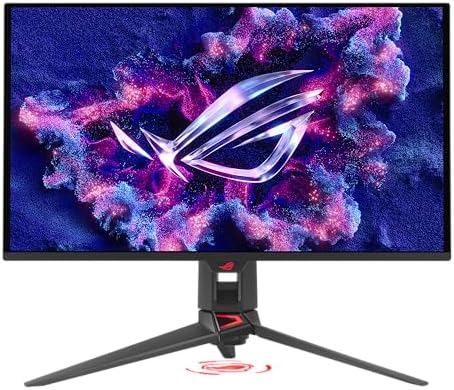
What we like
- 27" 4K QD-OLED at 240Hz hits both productivity sharpness and high-refresh gaming
- Neo Proximity Sensor dims the panel automatically when you step away, meaningfully reducing burn-in risk on static UI
- DisplayPort 2.1a UHBR20 carries native 4K/240Hz without DSC compression
- Custom heatsink and graphene film keep panel temps lower than most competing QD-OLEDs
- ROG Care Pro suite adds pixel cleaning, screen savers, taskbar dimming, and uniform brightness
Could be better
- $200 premium over the Alienware AW2725Q with similar core panel specs
- QD-OLED still struggles with ABL and reflectivity in bright rooms — not a daylight desk monitor
- Stand is large and the chassis is firmly gamer-styled, not office-neutral
Full Review
The PG27UCDM is ASUS’s answer to the wave of 27” 4K QD-OLEDs that landed last year. The panel itself is the same fourth-gen Samsung Display QD-OLED stack you’ll find in the Alienware AW2725Q and MSI MPG 272URX — 3840x2160 at 240Hz, 0.03ms response, 99% DCI-P3, true 10-bit. What you’re paying ASUS for is everything wrapped around that panel.
What the $200 Premium Buys You
The biggest functional differentiator is the Neo Proximity Sensor. Unlike the basic presence detection on competing models, it dims aggressively when you walk away and ramps back up smoothly when you return. For anyone running a hybrid setup — Slack and a code editor by day, gaming at night — this is the single most useful burn-in mitigation feature available on a QD-OLED right now.
You also get a beefier custom heatsink and graphene thermal film, which measurably keeps the panel cooler under sustained load. Cooler QD-OLEDs lose less brightness to ABL and degrade slower. Add DisplayPort 2.1a UHBR20 (native uncompressed 4K/240Hz instead of DSC), and ASUS’s ROG Care Pro software suite, and the price gap starts to make sense.
Burn-in Protection for Home Office Use
This is the QD-OLED most worth considering if your primary use is actually work. The proximity sensor handles the biggest risk factor — static UI sitting on screen during long meetings and lunch breaks — automatically. Combined with taskbar dimming, uniform brightness, and the 3-year burn-in warranty, it removes most of the anxiety that’s kept OLED out of office setups.
It’s still QD-OLED, so the panel is reflective and the anti-reflective coating shows pink/purple tints in bright rooms. Treat this as a controlled-lighting monitor, not a sun-facing one.
vs. Alienware AW2725Q
The Alienware is $899 and gets you the same panel with a cleaner office-friendly aesthetic and Dell’s solid 3-year burn-in coverage. If you want pure value, buy that. The PG27UCDM justifies its $200 premium if (a) you want the proximity sensor automation, (b) you need DP 2.1a UHBR20 for uncompressed 4K/240Hz, or (c) you’ll actually use ROG Care Pro’s full burn-in tooling. Otherwise the Alienware wins on price.
Who Should Buy This
Buy the PG27UCDM if you want the best-equipped 4K QD-OLED on the market and you’re going to put static work content on it every day. The proximity sensor, custom heatsink, and ROG Care Pro suite are genuinely meaningful for home office use, not just marketing. If you only game on it, save the $200 and get the Alienware AW2725Q instead — the panel is identical.


