ASUS ZenScreen 15.6" Portable USB Monitor (MB16AC)
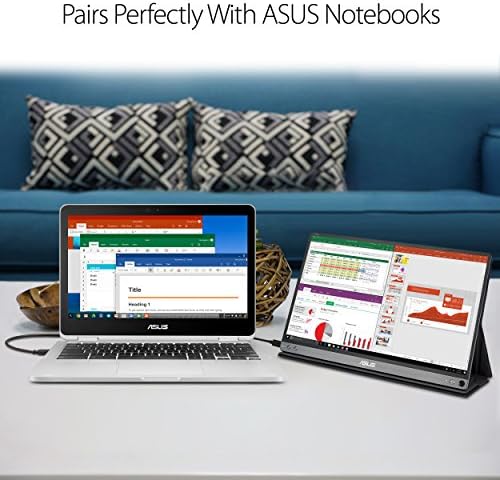
A 1.7-pound 1080p IPS portable monitor that runs off a single USB-C cable — the dual-screen solution for laptop users who work from the road.
Price may vary. As an affiliate, we earn from qualifying purchases.
What we like
- Runs on a single USB-C cable for power and video
- Genuinely portable at 1.7 lbs and 8mm thick
- Sharp 1080p IPS panel with anti-glare coating
- Smart case folds into a landscape or portrait stand
- Works with USB-A via included adapter for older laptops
Could be better
- 60Hz refresh rate only — not for gaming
- Brightness tops out around 220 nits, dim in sunlight
- No HDMI input — USB-C only
- Kickstand case is functional but flimsy
Full Review
The ASUS ZenScreen MB16AC is what a portable monitor should be: light enough to forget it’s in your bag, simple enough to plug in without thinking about it, and sharp enough to actually get work done on. It’s been the benchmark for single-cable portable displays for years, and it still holds up.
Build and Portability
At 1.7 pounds and 8mm thick, the MB16AC is about the size and weight of a slim 15-inch laptop. It slides into a laptop sleeve next to your MacBook without adding meaningful bulk. The all-aluminum back feels sturdier than you’d expect at this weight, and the bezels are narrow enough that the screen doesn’t feel dwarfed by its frame.
The included smart cover folds origami-style into a stand, propping the monitor in either landscape or portrait orientation. It works, but it’s the weakest part of the package — if you bump the desk, the whole thing shifts. A third-party stand or a Moft-style adhesive kickstand is a worthwhile upgrade for permanent desk use.
Connectivity and Image Quality
Single-cable USB-C is the headline feature. Plug one end into a modern laptop that supports DisplayPort Alt Mode and the monitor powers on and starts displaying — no wall wart, no separate power brick, no driver install. For older laptops without USB-C, ASUS includes an adapter that lets you run it off USB-A, though you’ll need the DisplayLink driver for that path.
The 1080p IPS panel is genuinely good. Colors are accurate enough for photo triage and video calls, viewing angles are wide, and the anti-glare coating cuts reflections in coffee shops and hotel rooms. Brightness is the honest compromise — 220 nits is fine indoors but struggles in a sunlit window seat on a plane.
Daily Use
For a traveling laptop setup, the MB16AC is transformative. Having a real second screen for Slack, reference docs, or a video feed while you work on the primary display is the kind of quality-of-life upgrade you don’t realize you needed until you try it. Battery drain on the host laptop is noticeable — expect 20-30% shorter runtime when the monitor is bus-powered.
It also works fine as a permanent second display on a small desk where a full-size monitor would dominate. The portrait orientation is particularly useful for long documents and code.
Who Should Buy This
Buy the MB16AC if you’re a laptop-primary user who travels and wants a real dual-monitor setup on the road, or if your desk is too small for a proper second display. If you want a brighter panel or HDMI input, the newer ZenScreen MB16ACV adds a built-in kickstand and is worth the small upcharge. Gamers and anyone who needs color-critical work should look elsewhere — this is a productivity tool, not a creative display.


